LogDog
Description
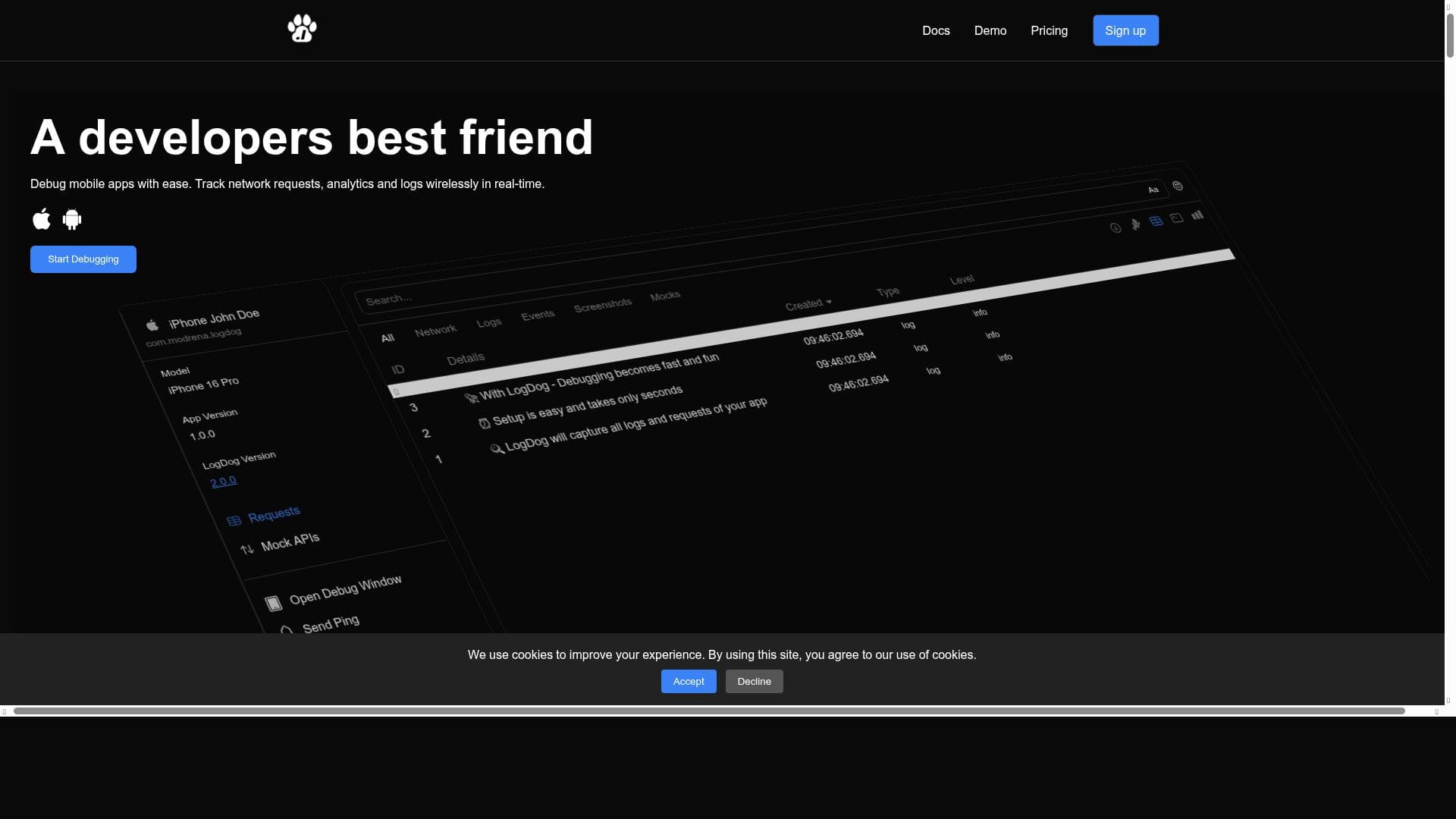
LogDog is a powerful remote debugging and logging SDK tailored for iOS and Android apps, offering real-time capture and interception of logs, network requests, and events via a user-friendly web interface. It empowers mobile developers to debug faster and ship apps with confidence by providing comprehensive, live insights into app performance and issues.
LogDog is a sophisticated remote debugging and logging software development kit (SDK) designed specifically for mobile applications on iOS and Android platforms. Its core purpose is to provide developers with a comprehensive, real-time insight into their app’s behavior by capturing all logs, network requests, and events through an intuitive web user interface. This capability allows developers to monitor and intercept critical data streams remotely, enabling faster identification and resolution of issues without the need for physical device access or cumbersome manual log collection. By centralizing and streamlining the debugging process, LogDog significantly enhances the efficiency and accuracy of mobile app development and maintenance workflows. One of the standout features of LogDog is its real-time monitoring of network requests. Developers can observe API calls and data exchanges as they happen, which is crucial for diagnosing connectivity issues, performance bottlenecks, or unexpected server responses. Alongside this, LogDog captures real-time logs and events, providing a granular view of app activity that helps pinpoint the exact moment and context of errors or crashes. This continuous stream of information is accessible through a web UI, making it easy to filter, search, and analyze logs without interrupting the user experience. The ability to intercept logs and requests remotely means developers can reproduce and debug issues in live environments, reducing turnaround times and improving app stability. LogDog is particularly well-suited for mobile app developers, QA engineers, and product teams who require robust debugging tools that work seamlessly across both iOS and Android devices. It is ideal for teams shipping apps that demand high reliability and performance, as it supports proactive monitoring and quick troubleshooting. Use cases include debugging network-related problems, tracking down elusive bugs that only appear in production, and monitoring event flows to ensure feature functionality. Its cross-platform support ensures that teams managing apps on multiple operating systems can rely on a single tool for consistent logging and debugging. The pricing model for LogDog follows a freemium approach, allowing users to start with a free tier that provides essential logging and monitoring capabilities. This is particularly beneficial for small teams or individual developers who want to evaluate the tool’s effectiveness before committing financially. Paid plans likely offer enhanced features such as increased log retention, advanced filtering options, priority support, and possibly integrations with other development tools or platforms. This scalable pricing structure makes LogDog accessible to a wide range of users, from indie developers to enterprise teams. Compared to alternative debugging and logging solutions, LogDog stands out due to its focus on mobile platforms and its real-time, remote interception capabilities. Many traditional logging tools require manual log retrieval or are limited to local debugging, whereas LogDog’s web-based interface and continuous monitoring provide a more dynamic and user-friendly experience. While some competitors may offer broader platform support or deeper integrations, LogDog’s specialization in mobile SDKs and its ease of use make it a compelling choice for mobile-first development teams. However, potential users should consider certain limitations. As a remote debugging tool, LogDog’s effectiveness depends on stable network connectivity and proper SDK integration within the app. Additionally, while the freemium plan offers a good starting point, teams with extensive logging needs or complex use cases may need to invest in higher-tier plans. Furthermore, the tool’s focus on iOS and Android means it may not be suitable for developers working on other platforms or cross-platform frameworks without native support. Overall, LogDog provides a powerful, targeted solution for mobile app debugging that can significantly improve development workflows when integrated thoughtfully.

Description
LogDog is a powerful remote debugging and logging SDK tailored for iOS and Android apps, offering real-time capture and interception of logs, network requests, and events via a user-friendly web interface. It empowers mobile developers to debug faster and ship apps with confidence by providing comprehensive, live insights into app performance and issues.
LogDog is a sophisticated remote debugging and logging software development kit (SDK) designed specifically for mobile applications on iOS and Android platforms. Its core purpose is to provide developers with a comprehensive, real-time insight into their app’s behavior by capturing all logs, network requests, and events through an intuitive web user interface. This capability allows developers to monitor and intercept critical data streams remotely, enabling faster identification and resolution of issues without the need for physical device access or cumbersome manual log collection. By centralizing and streamlining the debugging process, LogDog significantly enhances the efficiency and accuracy of mobile app development and maintenance workflows. One of the standout features of LogDog is its real-time monitoring of network requests. Developers can observe API calls and data exchanges as they happen, which is crucial for diagnosing connectivity issues, performance bottlenecks, or unexpected server responses. Alongside this, LogDog captures real-time logs and events, providing a granular view of app activity that helps pinpoint the exact moment and context of errors or crashes. This continuous stream of information is accessible through a web UI, making it easy to filter, search, and analyze logs without interrupting the user experience. The ability to intercept logs and requests remotely means developers can reproduce and debug issues in live environments, reducing turnaround times and improving app stability. LogDog is particularly well-suited for mobile app developers, QA engineers, and product teams who require robust debugging tools that work seamlessly across both iOS and Android devices. It is ideal for teams shipping apps that demand high reliability and performance, as it supports proactive monitoring and quick troubleshooting. Use cases include debugging network-related problems, tracking down elusive bugs that only appear in production, and monitoring event flows to ensure feature functionality. Its cross-platform support ensures that teams managing apps on multiple operating systems can rely on a single tool for consistent logging and debugging. The pricing model for LogDog follows a freemium approach, allowing users to start with a free tier that provides essential logging and monitoring capabilities. This is particularly beneficial for small teams or individual developers who want to evaluate the tool’s effectiveness before committing financially. Paid plans likely offer enhanced features such as increased log retention, advanced filtering options, priority support, and possibly integrations with other development tools or platforms. This scalable pricing structure makes LogDog accessible to a wide range of users, from indie developers to enterprise teams. Compared to alternative debugging and logging solutions, LogDog stands out due to its focus on mobile platforms and its real-time, remote interception capabilities. Many traditional logging tools require manual log retrieval or are limited to local debugging, whereas LogDog’s web-based interface and continuous monitoring provide a more dynamic and user-friendly experience. While some competitors may offer broader platform support or deeper integrations, LogDog’s specialization in mobile SDKs and its ease of use make it a compelling choice for mobile-first development teams. However, potential users should consider certain limitations. As a remote debugging tool, LogDog’s effectiveness depends on stable network connectivity and proper SDK integration within the app. Additionally, while the freemium plan offers a good starting point, teams with extensive logging needs or complex use cases may need to invest in higher-tier plans. Furthermore, the tool’s focus on iOS and Android means it may not be suitable for developers working on other platforms or cross-platform frameworks without native support. Overall, LogDog provides a powerful, targeted solution for mobile app debugging that can significantly improve development workflows when integrated thoughtfully.
Tool Features
- Monitor network requests in real-time
- Real-time logs and event monitoring
- Debug faster for mobile apps
- Supports iOS and Android platforms
- Ship apps with confidence
Frequently Asked Questions
What is LogDog?
LogDog is a remote debugging and logging SDK designed for iOS and Android mobile applications. It captures all logs, network requests, and events in real-time and provides a web-based interface to monitor and intercept this data remotely.
How much does LogDog cost?
LogDog offers a freemium pricing model, allowing users to access basic logging and monitoring features for free. Paid plans with advanced capabilities and higher usage limits are available for teams with more extensive needs.
Who is LogDog best for?
LogDog is ideal for mobile app developers, QA engineers, and product teams working on iOS and Android apps who need efficient, real-time debugging and monitoring tools to improve app stability and speed up issue resolution.
What are the main features of LogDog?
Key features include real-time monitoring of network requests, live logs and event tracking, remote interception of logs, support for both iOS and Android platforms, and a web UI that enables easy filtering and analysis of captured data.
Does LogDog offer a free trial?
Yes, LogDog provides a freemium plan that allows users to try out its core features for free, making it easy to evaluate the tool before upgrading to paid plans.
What integrations does LogDog support?
While specific integrations are not detailed, LogDog primarily integrates as an SDK within mobile apps on iOS and Android. It may also offer web UI access and potentially support integration with other development tools depending on the plan.
How does LogDog work?
LogDog works by embedding its SDK into mobile applications, which captures logs, network requests, and events in real-time. This data is then transmitted to a web-based interface where developers can monitor, filter, and intercept information remotely to debug and analyze app behavior.
Socials
Use ToolSponsored Tools























Reviews
No reviews yet. Be the first to share your experience.