Notion Developer Platform
Description
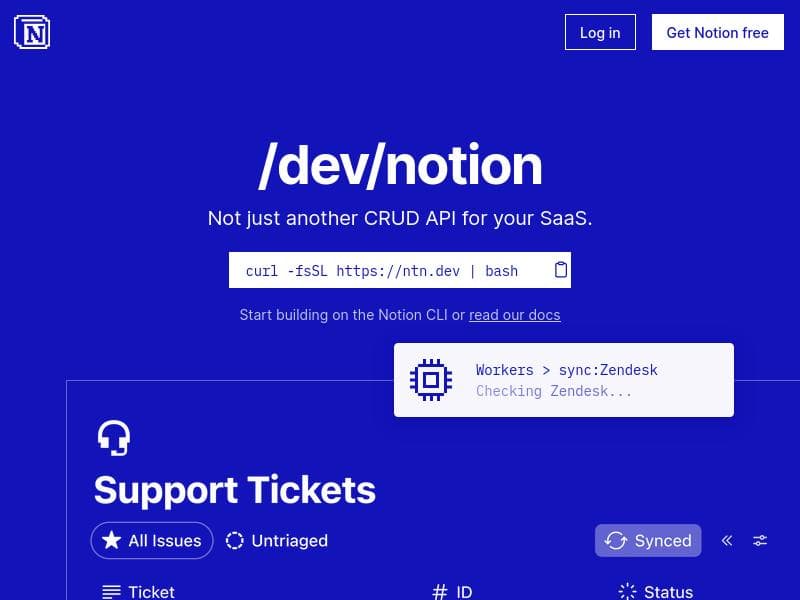
Notion Developer Platform empowers teams to build custom integrations, agent tools, and workflows directly within Notion’s shared workspace, eliminating the need for external infrastructure. Ideal for developers and businesses seeking to centralize data and automation in one collaborative environment, it offers seamless syncing, orchestration, and extensibility tailored to Notion users.
The Notion Developer Platform is a powerful and versatile tool designed to extend the capabilities of Notion, a popular all-in-one workspace, by enabling teams and developers to build custom integrations, workflows, and agent tools directly within the Notion environment. Its core purpose is to unify data, workflows, and automation agents inside a single shared workspace, allowing organizations to streamline collaboration and operational efficiency without needing to manage separate infrastructure. By leveraging a comprehensive suite of developer tools including a Command Line Interface (CLI), Workers, database synchronization, webhook triggers, and APIs such as MCP and External Agents, the platform empowers users to create highly customized solutions tailored to their unique business needs. Key features of the Notion Developer Platform include the ability to sync any data source seamlessly with Notion’s databases, enabling real-time updates and unified data management. Developers can build any type of agent tool that interacts with Notion’s workspace, from simple automation scripts to complex AI-driven workflows. The platform also supports orchestrating multiple agents, allowing for sophisticated multi-step processes and conditional logic to be executed within Notion. One of the standout capabilities is that it requires no additional infrastructure, meaning teams can deploy and run their custom tools and integrations without worrying about server management or hosting costs. Furthermore, the platform offers a single shared canvas where team members can collaborate, view data, and interact with automated agents, fostering transparency and collective productivity. The Notion Developer Platform is best suited for product teams, developers, and businesses that rely heavily on Notion for project management, documentation, and collaboration but need to extend its functionality beyond out-of-the-box features. Use cases include syncing external CRM or ERP data into Notion for unified reporting, building custom AI agents that automate repetitive tasks like data entry or notifications, orchestrating complex workflows that span multiple tools, and creating webhook-triggered automations that respond instantly to changes within or outside Notion. It is particularly valuable for teams looking to centralize their operations in one workspace while maintaining flexibility and control over their data and processes. Pricing for the Notion Developer Platform follows a freemium model, allowing users to start building and experimenting with core features at no cost. This approach lowers the barrier to entry for smaller teams or individual developers who want to explore the platform’s capabilities. For organizations requiring advanced features, higher usage limits, or enterprise-grade support, paid plans are available, although specific pricing details are typically provided upon inquiry or through the Notion sales team. This flexible pricing structure makes the platform accessible to a wide range of users, from startups to large enterprises. When compared to alternative developer platforms and integration tools, Notion Developer Platform stands out due to its deep native integration with Notion’s workspace and its focus on enabling agent-based automation and data orchestration within a shared collaborative environment. Unlike standalone automation platforms that require separate dashboards or infrastructure, Notion’s approach keeps everything within the familiar Notion interface, reducing context switching and improving user adoption. However, while powerful, it may not yet match the breadth of integrations offered by some dedicated automation platforms like Zapier or Integromat, especially for non-Notion-centric workflows. Notable limitations to consider include the learning curve associated with using the CLI and APIs effectively, which may require some developer expertise. Additionally, because the platform is relatively new and specialized, the ecosystem of pre-built integrations and community support may be less mature compared to more established automation tools. Users should also evaluate their specific needs around scalability and complex multi-system integrations to ensure the platform aligns with their long-term goals. Overall, the Notion Developer Platform offers a compelling solution for teams invested in Notion who want to unlock advanced automation and integration capabilities without leaving their primary workspace.

Description
Notion Developer Platform empowers teams to build custom integrations, agent tools, and workflows directly within Notion’s shared workspace, eliminating the need for external infrastructure. Ideal for developers and businesses seeking to centralize data and automation in one collaborative environment, it offers seamless syncing, orchestration, and extensibility tailored to Notion users.
The Notion Developer Platform is a powerful and versatile tool designed to extend the capabilities of Notion, a popular all-in-one workspace, by enabling teams and developers to build custom integrations, workflows, and agent tools directly within the Notion environment. Its core purpose is to unify data, workflows, and automation agents inside a single shared workspace, allowing organizations to streamline collaboration and operational efficiency without needing to manage separate infrastructure. By leveraging a comprehensive suite of developer tools including a Command Line Interface (CLI), Workers, database synchronization, webhook triggers, and APIs such as MCP and External Agents, the platform empowers users to create highly customized solutions tailored to their unique business needs. Key features of the Notion Developer Platform include the ability to sync any data source seamlessly with Notion’s databases, enabling real-time updates and unified data management. Developers can build any type of agent tool that interacts with Notion’s workspace, from simple automation scripts to complex AI-driven workflows. The platform also supports orchestrating multiple agents, allowing for sophisticated multi-step processes and conditional logic to be executed within Notion. One of the standout capabilities is that it requires no additional infrastructure, meaning teams can deploy and run their custom tools and integrations without worrying about server management or hosting costs. Furthermore, the platform offers a single shared canvas where team members can collaborate, view data, and interact with automated agents, fostering transparency and collective productivity. The Notion Developer Platform is best suited for product teams, developers, and businesses that rely heavily on Notion for project management, documentation, and collaboration but need to extend its functionality beyond out-of-the-box features. Use cases include syncing external CRM or ERP data into Notion for unified reporting, building custom AI agents that automate repetitive tasks like data entry or notifications, orchestrating complex workflows that span multiple tools, and creating webhook-triggered automations that respond instantly to changes within or outside Notion. It is particularly valuable for teams looking to centralize their operations in one workspace while maintaining flexibility and control over their data and processes. Pricing for the Notion Developer Platform follows a freemium model, allowing users to start building and experimenting with core features at no cost. This approach lowers the barrier to entry for smaller teams or individual developers who want to explore the platform’s capabilities. For organizations requiring advanced features, higher usage limits, or enterprise-grade support, paid plans are available, although specific pricing details are typically provided upon inquiry or through the Notion sales team. This flexible pricing structure makes the platform accessible to a wide range of users, from startups to large enterprises. When compared to alternative developer platforms and integration tools, Notion Developer Platform stands out due to its deep native integration with Notion’s workspace and its focus on enabling agent-based automation and data orchestration within a shared collaborative environment. Unlike standalone automation platforms that require separate dashboards or infrastructure, Notion’s approach keeps everything within the familiar Notion interface, reducing context switching and improving user adoption. However, while powerful, it may not yet match the breadth of integrations offered by some dedicated automation platforms like Zapier or Integromat, especially for non-Notion-centric workflows. Notable limitations to consider include the learning curve associated with using the CLI and APIs effectively, which may require some developer expertise. Additionally, because the platform is relatively new and specialized, the ecosystem of pre-built integrations and community support may be less mature compared to more established automation tools. Users should also evaluate their specific needs around scalability and complex multi-system integrations to ensure the platform aligns with their long-term goals. Overall, the Notion Developer Platform offers a compelling solution for teams invested in Notion who want to unlock advanced automation and integration capabilities without leaving their primary workspace.
Tool Features
- Sync any data source
- Build any agent tool
- Orchestrate any agent
- No infrastructure required
- One shared canvas for team collaboration
Frequently Asked Questions
What is Notion Developer Platform?
Notion Developer Platform is a set of tools and APIs that allow teams and developers to build custom integrations, automate workflows, and create agent tools within the Notion workspace, enabling data and processes to operate seamlessly in a shared environment.
How much does Notion Developer Platform cost?
The platform offers a freemium pricing model, allowing users to access core features for free with options to upgrade to paid plans for advanced capabilities and higher usage limits. Specific pricing details are available through Notion’s sales channels.
Who is Notion Developer Platform best for?
It is best suited for product teams, developers, and businesses that use Notion extensively and want to extend its functionality with custom integrations, automation, and agent orchestration within a unified workspace.
What are the main features of Notion Developer Platform?
Key features include syncing any data source with Notion databases, building and orchestrating custom agent tools, webhook triggers, CLI and Workers support, no infrastructure requirements, and a shared canvas for team collaboration.
Does Notion Developer Platform offer a free trial?
Yes, the platform operates on a freemium model, allowing users to start using many features for free without a time-limited trial, making it easy to explore and build on Notion.
What integrations does Notion Developer Platform support?
It supports syncing with any data source through APIs and webhooks, enabling integrations with external systems like CRMs, ERPs, and other databases, as well as custom-built agent tools and workflows within Notion.
How does Notion Developer Platform work?
Developers use the platform’s CLI, APIs, and webhook triggers to build and deploy custom tools and automations that sync data and orchestrate agents inside Notion, all running without requiring separate infrastructure and accessible within a shared workspace.
Socials
Use ToolSponsored Tools













































Reviews
No reviews yet. Be the first to share your experience.










