Monologue for iOS
Description
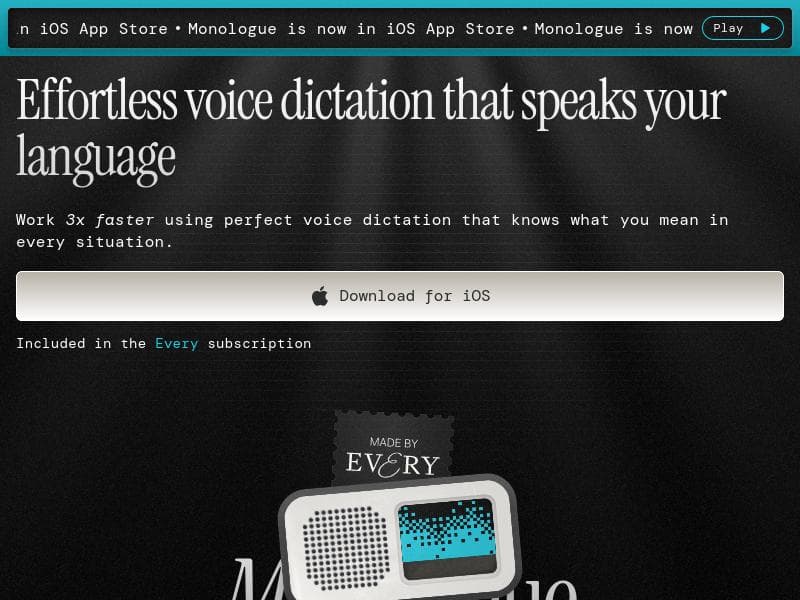
Monologue for iOS revolutionizes voice dictation by not just transcribing but intelligently rewriting your speech into polished, context-aware text within your favorite apps. Perfect for professionals, students, and anyone seeking faster, more natural writing, it transforms spoken words into clear, human-like messages and notes with ease.
Monologue for iOS is an advanced AI-powered voice dictation tool designed to transform spoken words into polished, contextually accurate written text within the apps you already use. Unlike traditional dictation software that simply transcribes speech verbatim, Monologue goes several steps further by rewriting sentences, removing filler words, adding appropriate punctuation, and adapting the output to fit the context of your communication. This makes your texts sound natural, your emails feel human, and your notes organized and clear. Whether you're coding in the terminal, sending a quick message to a family member, or jotting down ideas, Monologue streamlines the process of converting voice to text, making it the shortest and most efficient path from speech to written communication. At its core, Monologue leverages sophisticated AI algorithms to understand user intent and context, enabling it to produce text that reads naturally and professionally. Key features include AI voice dictation that comprehends the nuances of spoken language, enabling users to write up to three times faster than typing manually. The tool offers highly accurate transcription of spoken words, minimizing errors and the need for manual corrections. Its effortless voice-to-text conversion works seamlessly inside existing iOS apps, allowing users to dictate messages, emails, notes, or even code without switching platforms or interrupting their workflow. Monologue is ideal for a wide range of users who rely on efficient and accurate text input. Professionals who frequently compose emails or reports can benefit from its ability to produce human-like, polished text quickly. Developers and coders can dictate commands or code snippets directly in the terminal, speeding up their workflow. Students and writers can use Monologue to capture ideas and notes in a structured format, transforming scattered thoughts into clear lists and paragraphs. Additionally, anyone who prefers speaking over typing, including those with disabilities or those on the go, will find Monologue invaluable for maintaining productivity. The app operates on a freemium pricing model, allowing users to access basic features for free with the option to upgrade for enhanced capabilities. This approach makes it accessible to casual users while providing more advanced functionality for professionals who require higher accuracy, additional customization, or extended usage. Details on specific pricing tiers and premium features can be found on the Monologue website. Compared to other voice-to-text solutions, Monologue stands out due to its intelligent rewriting and contextual adaptation. While many dictation tools simply convert speech to text verbatim, Monologue enhances the output by removing unnecessary filler words, adding punctuation, and ensuring the text fits the intended communication style. This results in more readable and professional text without the need for extensive editing. Its integration within existing iOS apps also offers a smoother user experience than standalone dictation apps that require switching contexts. However, users should consider that Monologue is currently available only on iOS, which may limit accessibility for those using other platforms. Additionally, while the AI is highly advanced, extremely technical or specialized vocabulary may occasionally require manual adjustments. Users should also be aware that the freemium model may restrict some features behind a paywall, which could impact heavy users. Despite these considerations, Monologue remains a powerful tool for anyone looking to enhance their productivity by converting speech into clean, polished writing effortlessly.

Description
Monologue for iOS revolutionizes voice dictation by not just transcribing but intelligently rewriting your speech into polished, context-aware text within your favorite apps. Perfect for professionals, students, and anyone seeking faster, more natural writing, it transforms spoken words into clear, human-like messages and notes with ease.
Monologue for iOS is an advanced AI-powered voice dictation tool designed to transform spoken words into polished, contextually accurate written text within the apps you already use. Unlike traditional dictation software that simply transcribes speech verbatim, Monologue goes several steps further by rewriting sentences, removing filler words, adding appropriate punctuation, and adapting the output to fit the context of your communication. This makes your texts sound natural, your emails feel human, and your notes organized and clear. Whether you're coding in the terminal, sending a quick message to a family member, or jotting down ideas, Monologue streamlines the process of converting voice to text, making it the shortest and most efficient path from speech to written communication. At its core, Monologue leverages sophisticated AI algorithms to understand user intent and context, enabling it to produce text that reads naturally and professionally. Key features include AI voice dictation that comprehends the nuances of spoken language, enabling users to write up to three times faster than typing manually. The tool offers highly accurate transcription of spoken words, minimizing errors and the need for manual corrections. Its effortless voice-to-text conversion works seamlessly inside existing iOS apps, allowing users to dictate messages, emails, notes, or even code without switching platforms or interrupting their workflow. Monologue is ideal for a wide range of users who rely on efficient and accurate text input. Professionals who frequently compose emails or reports can benefit from its ability to produce human-like, polished text quickly. Developers and coders can dictate commands or code snippets directly in the terminal, speeding up their workflow. Students and writers can use Monologue to capture ideas and notes in a structured format, transforming scattered thoughts into clear lists and paragraphs. Additionally, anyone who prefers speaking over typing, including those with disabilities or those on the go, will find Monologue invaluable for maintaining productivity. The app operates on a freemium pricing model, allowing users to access basic features for free with the option to upgrade for enhanced capabilities. This approach makes it accessible to casual users while providing more advanced functionality for professionals who require higher accuracy, additional customization, or extended usage. Details on specific pricing tiers and premium features can be found on the Monologue website. Compared to other voice-to-text solutions, Monologue stands out due to its intelligent rewriting and contextual adaptation. While many dictation tools simply convert speech to text verbatim, Monologue enhances the output by removing unnecessary filler words, adding punctuation, and ensuring the text fits the intended communication style. This results in more readable and professional text without the need for extensive editing. Its integration within existing iOS apps also offers a smoother user experience than standalone dictation apps that require switching contexts. However, users should consider that Monologue is currently available only on iOS, which may limit accessibility for those using other platforms. Additionally, while the AI is highly advanced, extremely technical or specialized vocabulary may occasionally require manual adjustments. Users should also be aware that the freemium model may restrict some features behind a paywall, which could impact heavy users. Despite these considerations, Monologue remains a powerful tool for anyone looking to enhance their productivity by converting speech into clean, polished writing effortlessly.
Tool Features
- AI voice dictation that understands user intent
- Enables writing three times faster
- Accurate transcription of spoken words
- Effortless voice-to-text conversion
Frequently Asked Questions
What is Monologue for iOS?
Monologue for iOS is an AI-powered voice dictation app that converts your spoken words into polished, contextually accurate written text within the apps you already use. It goes beyond basic transcription by rewriting sentences, removing filler words, and adding punctuation to produce natural, human-like writing.
How much does Monologue for iOS cost?
Monologue for iOS operates on a freemium pricing model, offering basic features for free with optional premium plans that unlock advanced capabilities and extended usage. Specific pricing details are available on the Monologue website.
Who is Monologue for iOS best for?
Monologue is ideal for professionals, students, writers, developers, and anyone who wants to write faster and more naturally by speaking. It suits those who frequently compose emails, notes, code, or messages and prefer an efficient voice-to-text solution integrated within iOS apps.
What are the main features of Monologue for iOS?
Key features include AI voice dictation that understands user intent, accurate transcription of spoken words, rewriting and removal of filler words, automatic punctuation, contextual adaptation of text, and seamless integration within existing iOS applications to enable writing up to three times faster.
Does Monologue for iOS offer a free trial?
Monologue offers a freemium plan that allows users to access basic features for free. This enables users to try the core functionalities before deciding whether to upgrade to premium plans for additional features.
What integrations does Monologue for iOS support?
Monologue integrates directly within the apps you already use on iOS, allowing voice dictation and text conversion inside messaging apps, email clients, note-taking apps, coding terminals, and more, without needing to switch platforms.
How does Monologue for iOS work?
Monologue uses advanced AI to listen to your spoken words, understand the intent and context, then converts your speech into polished, punctuated, and natural-sounding text. It removes filler words and restructures sentences to ensure the output reads clearly and professionally.
Socials
Use ToolSponsored Tools













































Reviews
No reviews yet. Be the first to share your experience.