Description
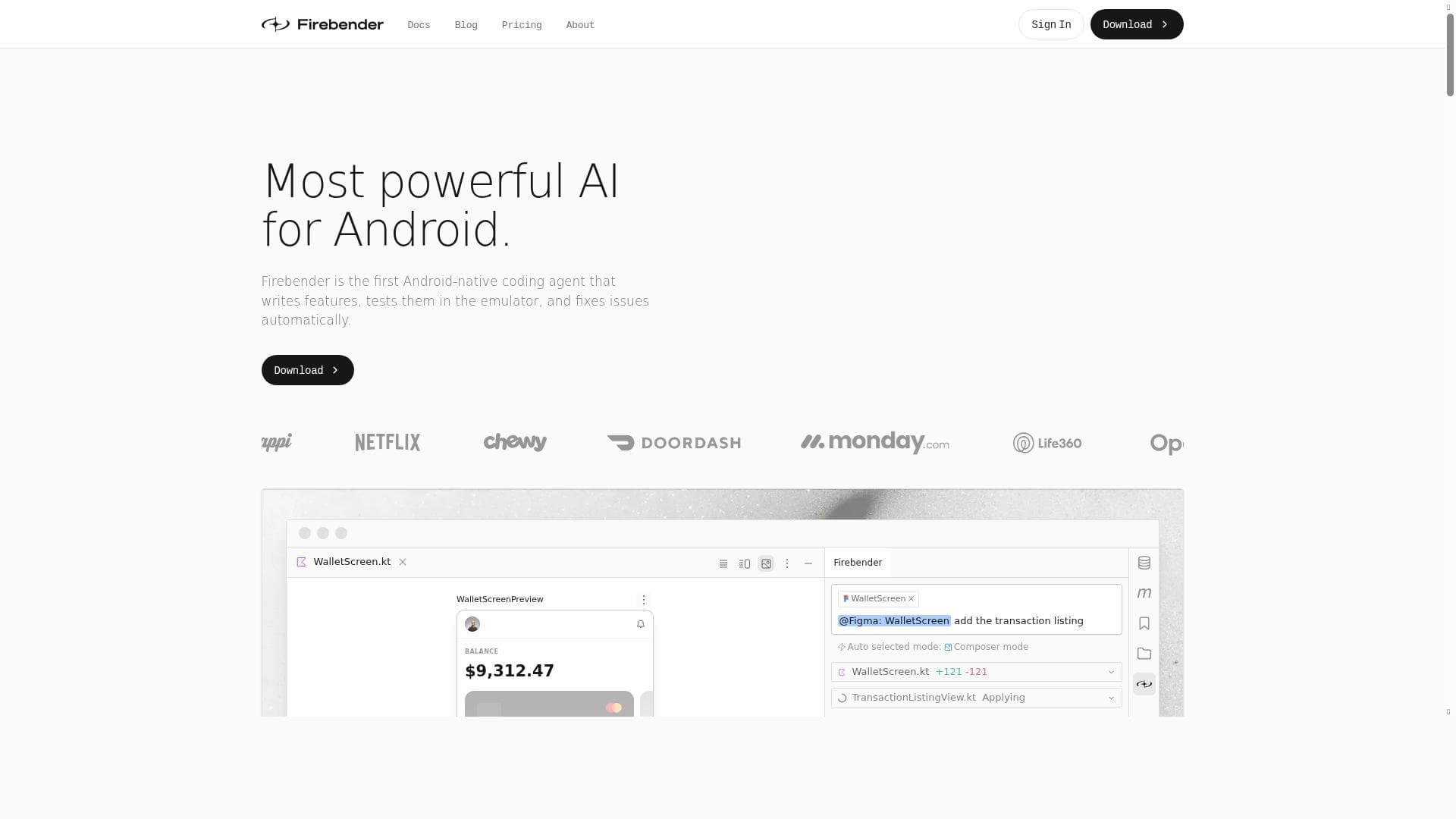
Firebender is a powerful AI assistant plugin for Android Studio that accelerates coding by up to 10x with intelligent code suggestions and AI chat over codebases, logs, and emulators. Ideal for Android developers seeking to boost productivity and stay current with the latest Android knowledge, Firebender seamlessly integrates into the development workflow to deliver context-aware support.
Firebender is an advanced AI-powered assistant designed specifically for Android Studio, aimed at revolutionizing the way developers write and manage Android applications. Its core purpose is to significantly accelerate the coding process, enhance developer productivity, and provide intelligent support directly within the Android Studio environment. By integrating seamlessly as a plugin, Firebender offers a unique AI chat interface that interacts with your codebases, logs, and emulators, enabling developers to get contextual assistance and quick solutions without leaving their IDE. This integration ensures that developers can maintain their workflow uninterrupted while leveraging cutting-edge AI capabilities tailored for Android development. One of the standout features of Firebender is its ability to help developers write code up to 10 times faster. This is achieved through intelligent code suggestions that are context-aware and based on the latest Android development practices. The AI assistant can understand complex code structures, provide relevant snippets, and suggest improvements or fixes, reducing the time spent on debugging and manual coding. Additionally, Firebender supports quick file edits, allowing developers to modify code files efficiently with AI-guided recommendations. The plugin also offers AI chat functionality that can analyze logs and emulator outputs, helping developers diagnose issues and optimize their applications more effectively. Firebender’s models are continuously updated with the latest Android knowledge, ensuring that the suggestions and assistance it provides are aligned with current best practices and Android platform updates. This makes it an invaluable tool for developers who want to stay ahead in the fast-evolving Android ecosystem. The AI assistant is designed to enhance productivity by automating repetitive tasks, reducing errors, and providing instant access to relevant coding information. This tool is best suited for Android developers ranging from beginners to experienced professionals who want to streamline their development process. It is particularly useful for teams working on complex projects where quick iteration and debugging are critical. Startups, freelance developers, and large development teams can all benefit from Firebender’s ability to speed up coding, improve code quality, and reduce time-to-market for Android applications. Firebender is a paid tool, reflecting its advanced capabilities and continuous updates. Pricing details are available on their website, typically structured to accommodate individual developers as well as enterprise teams. While it does not currently offer a free version, potential users can explore the tool through demos or trial periods if available, to evaluate its fit for their workflow. Compared to other AI coding assistants, Firebender stands out due to its exclusive focus on Android Studio and its deep integration with Android-specific development tools like emulators and log systems. Unlike generic AI coding tools, Firebender’s specialized knowledge base and contextual understanding of Android development provide more accurate and relevant assistance. However, users should consider that its specialization means it is not suitable for non-Android development environments. Notable limitations include the requirement to use Android Studio as the development environment, which may exclude developers using alternative IDEs. Additionally, as a paid plugin, it may not be accessible to hobbyists or those with limited budgets. Users should also be aware that while AI assistance can greatly enhance productivity, it is not a substitute for thorough code review and testing. Developers must still apply their expertise to validate AI-generated code and suggestions. Overall, Firebender is a powerful AI assistant tailored for Android developers seeking to boost efficiency, reduce coding time, and leverage up-to-date Android knowledge directly within their IDE. Its intelligent features and deep integration make it a compelling choice for anyone serious about Android app development.

Description
Firebender is a powerful AI assistant plugin for Android Studio that accelerates coding by up to 10x with intelligent code suggestions and AI chat over codebases, logs, and emulators. Ideal for Android developers seeking to boost productivity and stay current with the latest Android knowledge, Firebender seamlessly integrates into the development workflow to deliver context-aware support.
Firebender is an advanced AI-powered assistant designed specifically for Android Studio, aimed at revolutionizing the way developers write and manage Android applications. Its core purpose is to significantly accelerate the coding process, enhance developer productivity, and provide intelligent support directly within the Android Studio environment. By integrating seamlessly as a plugin, Firebender offers a unique AI chat interface that interacts with your codebases, logs, and emulators, enabling developers to get contextual assistance and quick solutions without leaving their IDE. This integration ensures that developers can maintain their workflow uninterrupted while leveraging cutting-edge AI capabilities tailored for Android development. One of the standout features of Firebender is its ability to help developers write code up to 10 times faster. This is achieved through intelligent code suggestions that are context-aware and based on the latest Android development practices. The AI assistant can understand complex code structures, provide relevant snippets, and suggest improvements or fixes, reducing the time spent on debugging and manual coding. Additionally, Firebender supports quick file edits, allowing developers to modify code files efficiently with AI-guided recommendations. The plugin also offers AI chat functionality that can analyze logs and emulator outputs, helping developers diagnose issues and optimize their applications more effectively. Firebender’s models are continuously updated with the latest Android knowledge, ensuring that the suggestions and assistance it provides are aligned with current best practices and Android platform updates. This makes it an invaluable tool for developers who want to stay ahead in the fast-evolving Android ecosystem. The AI assistant is designed to enhance productivity by automating repetitive tasks, reducing errors, and providing instant access to relevant coding information. This tool is best suited for Android developers ranging from beginners to experienced professionals who want to streamline their development process. It is particularly useful for teams working on complex projects where quick iteration and debugging are critical. Startups, freelance developers, and large development teams can all benefit from Firebender’s ability to speed up coding, improve code quality, and reduce time-to-market for Android applications. Firebender is a paid tool, reflecting its advanced capabilities and continuous updates. Pricing details are available on their website, typically structured to accommodate individual developers as well as enterprise teams. While it does not currently offer a free version, potential users can explore the tool through demos or trial periods if available, to evaluate its fit for their workflow. Compared to other AI coding assistants, Firebender stands out due to its exclusive focus on Android Studio and its deep integration with Android-specific development tools like emulators and log systems. Unlike generic AI coding tools, Firebender’s specialized knowledge base and contextual understanding of Android development provide more accurate and relevant assistance. However, users should consider that its specialization means it is not suitable for non-Android development environments. Notable limitations include the requirement to use Android Studio as the development environment, which may exclude developers using alternative IDEs. Additionally, as a paid plugin, it may not be accessible to hobbyists or those with limited budgets. Users should also be aware that while AI assistance can greatly enhance productivity, it is not a substitute for thorough code review and testing. Developers must still apply their expertise to validate AI-generated code and suggestions. Overall, Firebender is a powerful AI assistant tailored for Android developers seeking to boost efficiency, reduce coding time, and leverage up-to-date Android knowledge directly within their IDE. Its intelligent features and deep integration make it a compelling choice for anyone serious about Android app development.
Tool Features
- Write code 10x faster
- Powerful AI assistant for Android Studio
- Intelligent code suggestions
- Enhances developer productivity
Frequently Asked Questions
What is Firebender?
Firebender is an AI-powered assistant plugin for Android Studio that helps developers write code faster, provides intelligent code suggestions, and offers AI chat capabilities over codebases, logs, and emulators, all with up-to-date Android knowledge.
How much does Firebender cost?
Firebender is a paid tool. Specific pricing details can be found on their official website, and they may offer different plans tailored for individual developers and enterprise teams.
Who is Firebender best for?
Firebender is best suited for Android developers of all levels, from beginners to experienced professionals, who use Android Studio and want to speed up coding, improve code quality, and enhance overall productivity.
What are the main features of Firebender?
Key features include writing code up to 10 times faster, intelligent code suggestions, AI chat over codebases, logs, and emulators, quick file edits, and models updated with the latest Android development knowledge.
Does Firebender offer a free trial?
Currently, Firebender is a paid plugin. Information about free trials or demos can be found on their website, but no explicit free trial is guaranteed.
What integrations does Firebender support?
Firebender integrates directly with Android Studio as a plugin and supports interaction with Android codebases, logs, and emulators within that environment.
How does Firebender work?
Firebender works by embedding an AI assistant within Android Studio that analyzes your code, logs, and emulator outputs to provide intelligent suggestions, quick edits, and contextual AI chat, helping you write and debug Android apps faster.
Socials
Use ToolSponsored Tools













































Reviews
No reviews yet. Be the first to share your experience.










