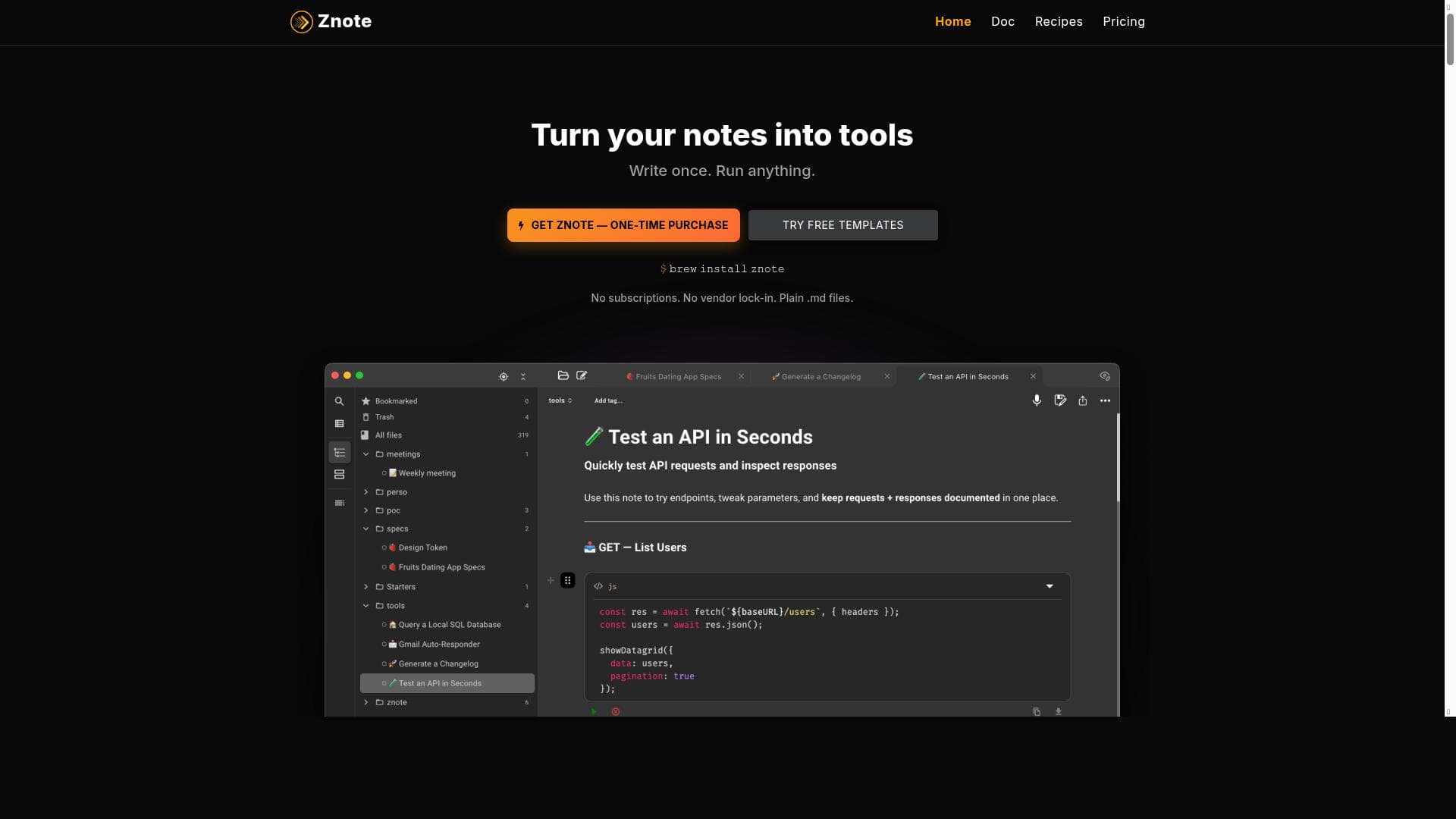
Description
Znote uniquely blends ChatGPT, Notion-style note-taking, and terminal code execution into one private, local app, empowering users to think, write, code, and automate workflows seamlessly without subscriptions. It's perfect for developers, knowledge workers, and privacy-conscious users seeking an all-in-one productivity workspace with offline support and full data control.
Znote is an innovative AI-powered productivity application that seamlessly integrates the conversational capabilities of ChatGPT, the organizational power of Notion, and the functionality of a terminal into a single, private, and local desktop app. Its core purpose is to provide users with a unified workspace where they can think, write, code, and automate workflows without relying on cloud services or subscriptions. By combining these diverse tools, Znote enables users to maintain full control over their data and work environment, making it ideal for professionals who prioritize privacy and efficiency. At its heart, Znote offers a rich set of features designed to enhance productivity and streamline complex tasks. The AI Chat feature allows users to engage in intelligent conversations powered by ChatGPT, facilitating brainstorming, problem-solving, and content generation directly within their notes. The Code Execution capability supports running code snippets in various programming languages, enabling developers and data scientists to test and debug code without leaving the app. Meeting Transcription functionality converts spoken content into text, helping users capture and organize meeting notes effortlessly. Znote’s Markdown Editor and WYSIWYG (What You See Is What You Get) interface provide flexible and user-friendly options for note-taking and document creation, catering to both technical users who prefer markdown syntax and those who want a more visual editing experience. Offline Support and Local-first design ensure that all data and AI interactions happen on the user's device, enhancing security and enabling uninterrupted work regardless of internet connectivity. Additionally, Znote supports BYOK (Bring Your Own Key), allowing users to use their own API keys for AI services, further enhancing privacy and customization. This tool is particularly well-suited for knowledge workers, developers, researchers, and productivity enthusiasts who require a versatile, secure, and integrated environment to manage their workflows. Use cases include continuing AI-assisted chats within detailed project notes, running code snippets alongside documentation, automating repetitive tasks through custom scripts, and transcribing meetings for accurate record-keeping. Its local-first approach appeals to users concerned about data privacy and those working in environments with limited or unreliable internet access. Znote operates on a freemium pricing model, offering a free tier that provides access to core features with the option to upgrade for enhanced capabilities or additional usage. Unlike many AI tools that require ongoing subscriptions, Znote emphasizes no subscription fees and full user control, making it an attractive option for budget-conscious users and those wary of vendor lock-in. Compared to alternatives like standalone AI chatbots, note-taking apps, or code editors, Znote’s unique value lies in its all-in-one integration and local-first architecture. While tools like Notion excel at organization and ChatGPT at AI conversation, Znote merges these with code execution and offline functionality, reducing the need to switch between multiple apps. However, users should consider that the local-first design may limit collaborative features compared to cloud-based platforms, and the reliance on user-provided API keys for AI services may require some technical setup. In summary, Znote is a powerful, privacy-focused AI productivity app that combines chat, note-taking, coding, and automation in one local workspace. It is ideal for users seeking an integrated, subscription-free solution to enhance their workflows while maintaining full control over their data. While it may not replace cloud-based collaborative tools for team projects, its rich feature set and offline capabilities make it a compelling choice for individual professionals and small teams prioritizing security and versatility.

Description
Znote uniquely blends ChatGPT, Notion-style note-taking, and terminal code execution into one private, local app, empowering users to think, write, code, and automate workflows seamlessly without subscriptions. It's perfect for developers, knowledge workers, and privacy-conscious users seeking an all-in-one productivity workspace with offline support and full data control.
Znote is an innovative AI-powered productivity application that seamlessly integrates the conversational capabilities of ChatGPT, the organizational power of Notion, and the functionality of a terminal into a single, private, and local desktop app. Its core purpose is to provide users with a unified workspace where they can think, write, code, and automate workflows without relying on cloud services or subscriptions. By combining these diverse tools, Znote enables users to maintain full control over their data and work environment, making it ideal for professionals who prioritize privacy and efficiency. At its heart, Znote offers a rich set of features designed to enhance productivity and streamline complex tasks. The AI Chat feature allows users to engage in intelligent conversations powered by ChatGPT, facilitating brainstorming, problem-solving, and content generation directly within their notes. The Code Execution capability supports running code snippets in various programming languages, enabling developers and data scientists to test and debug code without leaving the app. Meeting Transcription functionality converts spoken content into text, helping users capture and organize meeting notes effortlessly. Znote’s Markdown Editor and WYSIWYG (What You See Is What You Get) interface provide flexible and user-friendly options for note-taking and document creation, catering to both technical users who prefer markdown syntax and those who want a more visual editing experience. Offline Support and Local-first design ensure that all data and AI interactions happen on the user's device, enhancing security and enabling uninterrupted work regardless of internet connectivity. Additionally, Znote supports BYOK (Bring Your Own Key), allowing users to use their own API keys for AI services, further enhancing privacy and customization. This tool is particularly well-suited for knowledge workers, developers, researchers, and productivity enthusiasts who require a versatile, secure, and integrated environment to manage their workflows. Use cases include continuing AI-assisted chats within detailed project notes, running code snippets alongside documentation, automating repetitive tasks through custom scripts, and transcribing meetings for accurate record-keeping. Its local-first approach appeals to users concerned about data privacy and those working in environments with limited or unreliable internet access. Znote operates on a freemium pricing model, offering a free tier that provides access to core features with the option to upgrade for enhanced capabilities or additional usage. Unlike many AI tools that require ongoing subscriptions, Znote emphasizes no subscription fees and full user control, making it an attractive option for budget-conscious users and those wary of vendor lock-in. Compared to alternatives like standalone AI chatbots, note-taking apps, or code editors, Znote’s unique value lies in its all-in-one integration and local-first architecture. While tools like Notion excel at organization and ChatGPT at AI conversation, Znote merges these with code execution and offline functionality, reducing the need to switch between multiple apps. However, users should consider that the local-first design may limit collaborative features compared to cloud-based platforms, and the reliance on user-provided API keys for AI services may require some technical setup. In summary, Znote is a powerful, privacy-focused AI productivity app that combines chat, note-taking, coding, and automation in one local workspace. It is ideal for users seeking an integrated, subscription-free solution to enhance their workflows while maintaining full control over their data. While it may not replace cloud-based collaborative tools for team projects, its rich feature set and offline capabilities make it a compelling choice for individual professionals and small teams prioritizing security and versatility.
Tool Features
- AI Chat
- Code Execution
- Meeting Transcription
- Markdown Editor
- WYSIWYG
- Offline Support
- Local-first
- BYOK (Bring Your Own Key)
Frequently Asked Questions
What is Znote?
Znote is a private, local-first productivity app that combines AI chat powered by ChatGPT, Notion-style smart notes, and a terminal for code execution, enabling users to think, write, code, and automate workflows in one integrated workspace.
How much does Znote cost?
Znote offers a freemium pricing model, providing core features for free with optional upgrades for enhanced capabilities, all without requiring a subscription.
Who is Znote best for?
Znote is ideal for developers, knowledge workers, researchers, and productivity enthusiasts who want a secure, offline-capable workspace that integrates AI chat, note-taking, and code execution with full control over their data.
What are the main features of Znote?
Key features include AI Chat with ChatGPT, Code Execution for running scripts, Meeting Transcription, a Markdown Editor, WYSIWYG interface, Offline Support, Local-first data storage, and BYOK (Bring Your Own Key) for AI API integration.
Does Znote offer a free trial?
Znote operates on a freemium model, allowing users to access core features for free without a time-limited trial, with optional paid upgrades available.
What integrations does Znote support?
Znote integrates AI chat via ChatGPT and supports user-provided API keys (BYOK) for AI services. It also combines note-taking and code execution within one app but does not currently offer extensive third-party integrations.
How does Znote work?
Znote runs locally on your device, combining AI chat, note-taking, and code execution in a single app. It stores data locally for privacy, supports offline use, and allows users to bring their own AI API keys to power the chat and automation features.
Socials
Use ToolSponsored Tools













































Reviews
No reviews yet. Be the first to share your experience.
















