Description
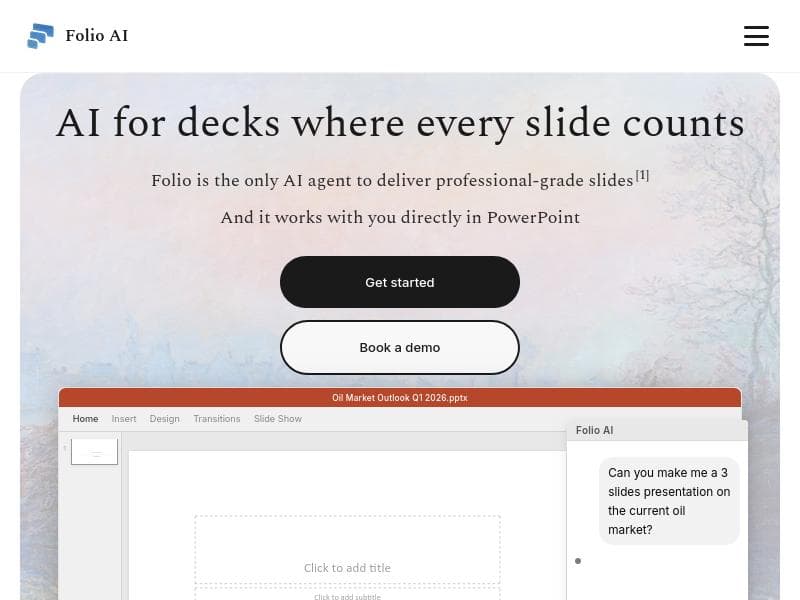
Folio AI is an AI-powered presentation assistant built directly into PowerPoint, designed to help consultants and finance teams create impactful, high-quality decks with ease. By streamlining slide creation and enhancing content, it transforms the deck-building process into a faster, smarter experience tailored to professional needs.
Folio AI is an advanced AI-powered tool specifically designed to revolutionize the way professionals create presentation decks, with a particular focus on consultants and finance teams. Its core purpose is to streamline and enhance the deck-building process directly within PowerPoint, ensuring that every slide is impactful and well-crafted. By integrating seamlessly into the PowerPoint environment, Folio AI eliminates the need to switch between multiple applications or manually design each slide, saving users significant time and effort while improving the overall quality of presentations. One of the standout features of Folio AI is its AI-driven deck creation capability. The tool leverages artificial intelligence to assist users in generating content, structuring slides, and optimizing the visual and textual elements of each presentation page. This results in decks that are not only visually appealing but also strategically designed to communicate key messages effectively. Folio AI is built with the unique needs of consultants and finance professionals in mind, who often require precise, data-driven, and persuasive presentations. The AI helps in crafting slides that highlight critical insights, financial data, and strategic recommendations, making the decks more compelling and easier to understand. Folio AI’s integration directly into PowerPoint is a major advantage, as it allows users to work within their familiar presentation software without disrupting their workflow. This integration supports a smooth user experience, enabling users to access AI features such as slide suggestions, content enhancement, and layout optimization without leaving PowerPoint. Additionally, the tool focuses on enhancing slide quality by improving clarity, consistency, and design aesthetics, which are crucial for high-stakes presentations. The tool is particularly well-suited for consultants and finance teams who regularly prepare decks for client meetings, internal reviews, or investor presentations. Use cases include creating pitch decks, financial reports, strategic plans, and market analysis presentations. By automating repetitive tasks and providing intelligent design recommendations, Folio AI helps these professionals focus more on the substance of their message rather than the mechanics of slide creation. Regarding pricing, Folio AI offers various plans tailored to different user needs, although specific pricing details are typically available on their official website or through direct inquiry. Many AI-powered tools in this niche provide tiered subscriptions based on features and usage volume, often including options for individual users, teams, and enterprises. Potential users should check Folio AI’s website for the most current pricing and any available free trials or demos. When compared to alternative presentation tools, Folio AI’s key differentiator is its deep integration with PowerPoint combined with AI capabilities specifically optimized for consulting and finance contexts. While other AI presentation tools may offer standalone platforms or generic slide generation, Folio AI’s focus on professional-grade decks and its seamless PowerPoint integration provide a more tailored and efficient solution for its target audience. However, users should consider that Folio AI’s specialization means it may be less suited for casual or creative presentation needs outside of consulting and finance. Additionally, as with any AI tool, the quality of output can depend on the input provided and may require human refinement to meet exact standards. Users should also be aware of any subscription costs and ensure compatibility with their existing software environment. In summary, Folio AI is a powerful AI assistant for professionals who need to create high-quality, impactful presentation decks quickly and efficiently within PowerPoint. Its specialized features for consultants and finance teams, combined with its AI-driven enhancements, make it a valuable tool for improving presentation effectiveness and saving time in the deck-building process.

Description
Folio AI is an AI-powered presentation assistant built directly into PowerPoint, designed to help consultants and finance teams create impactful, high-quality decks with ease. By streamlining slide creation and enhancing content, it transforms the deck-building process into a faster, smarter experience tailored to professional needs.
Folio AI is an advanced AI-powered tool specifically designed to revolutionize the way professionals create presentation decks, with a particular focus on consultants and finance teams. Its core purpose is to streamline and enhance the deck-building process directly within PowerPoint, ensuring that every slide is impactful and well-crafted. By integrating seamlessly into the PowerPoint environment, Folio AI eliminates the need to switch between multiple applications or manually design each slide, saving users significant time and effort while improving the overall quality of presentations. One of the standout features of Folio AI is its AI-driven deck creation capability. The tool leverages artificial intelligence to assist users in generating content, structuring slides, and optimizing the visual and textual elements of each presentation page. This results in decks that are not only visually appealing but also strategically designed to communicate key messages effectively. Folio AI is built with the unique needs of consultants and finance professionals in mind, who often require precise, data-driven, and persuasive presentations. The AI helps in crafting slides that highlight critical insights, financial data, and strategic recommendations, making the decks more compelling and easier to understand. Folio AI’s integration directly into PowerPoint is a major advantage, as it allows users to work within their familiar presentation software without disrupting their workflow. This integration supports a smooth user experience, enabling users to access AI features such as slide suggestions, content enhancement, and layout optimization without leaving PowerPoint. Additionally, the tool focuses on enhancing slide quality by improving clarity, consistency, and design aesthetics, which are crucial for high-stakes presentations. The tool is particularly well-suited for consultants and finance teams who regularly prepare decks for client meetings, internal reviews, or investor presentations. Use cases include creating pitch decks, financial reports, strategic plans, and market analysis presentations. By automating repetitive tasks and providing intelligent design recommendations, Folio AI helps these professionals focus more on the substance of their message rather than the mechanics of slide creation. Regarding pricing, Folio AI offers various plans tailored to different user needs, although specific pricing details are typically available on their official website or through direct inquiry. Many AI-powered tools in this niche provide tiered subscriptions based on features and usage volume, often including options for individual users, teams, and enterprises. Potential users should check Folio AI’s website for the most current pricing and any available free trials or demos. When compared to alternative presentation tools, Folio AI’s key differentiator is its deep integration with PowerPoint combined with AI capabilities specifically optimized for consulting and finance contexts. While other AI presentation tools may offer standalone platforms or generic slide generation, Folio AI’s focus on professional-grade decks and its seamless PowerPoint integration provide a more tailored and efficient solution for its target audience. However, users should consider that Folio AI’s specialization means it may be less suited for casual or creative presentation needs outside of consulting and finance. Additionally, as with any AI tool, the quality of output can depend on the input provided and may require human refinement to meet exact standards. Users should also be aware of any subscription costs and ensure compatibility with their existing software environment. In summary, Folio AI is a powerful AI assistant for professionals who need to create high-quality, impactful presentation decks quickly and efficiently within PowerPoint. Its specialized features for consultants and finance teams, combined with its AI-driven enhancements, make it a valuable tool for improving presentation effectiveness and saving time in the deck-building process.
Tool Features
- Works directly in PowerPoint
- Built for consultants and finance teams
- AI-powered deck creation
- Enhances presentation slide quality
- Streamlines deck-building process
Frequently Asked Questions
What is Folio AI?
Folio AI is an AI-powered tool integrated directly into PowerPoint that helps consultants and finance teams streamline and enhance the creation of presentation decks, ensuring every slide is impactful and professionally designed.
How much does Folio AI cost?
Folio AI offers various pricing plans tailored to different user needs. Specific pricing details are available on their official website, and users may find options for individual, team, or enterprise subscriptions.
Who is Folio AI best for?
Folio AI is best suited for consultants and finance professionals who regularly create data-driven, strategic presentations and need to improve efficiency and quality in their deck-building process.
What are the main features of Folio AI?
Key features include AI-powered deck creation, direct integration with PowerPoint, slide quality enhancement, and tools specifically designed to streamline presentation building for consultants and finance teams.
Does Folio AI offer a free trial?
Information about a free trial is typically provided on Folio AI’s official website. Potential users are encouraged to check there for the most current offers and trial availability.
What integrations does Folio AI support?
Folio AI integrates directly within Microsoft PowerPoint, allowing users to access AI features without leaving the PowerPoint environment. There are no indications of integrations with other platforms.
How does Folio AI work?
Folio AI uses artificial intelligence to assist users in creating and optimizing presentation slides within PowerPoint. It suggests content, improves slide design, and streamlines the deck-building process tailored to consulting and finance use cases.
Sponsored Tools













































Reviews
No reviews yet. Be the first to share your experience.