Description
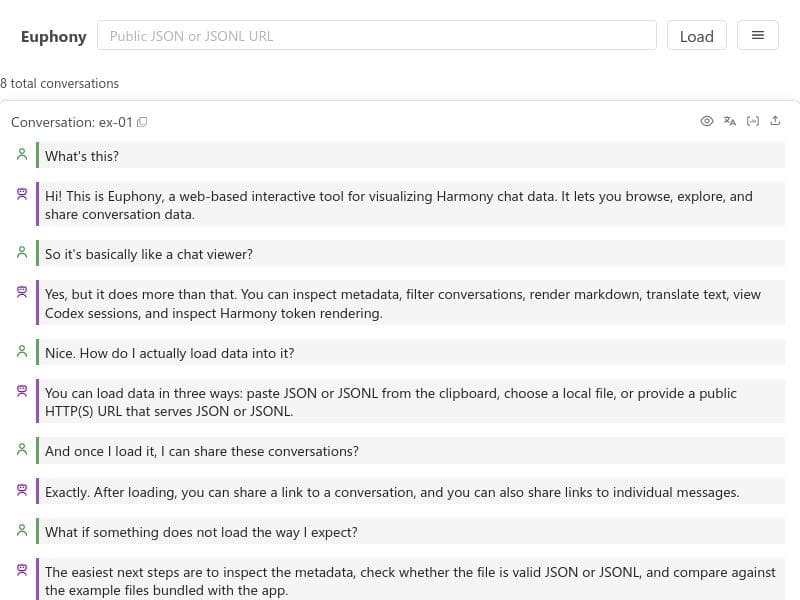
Euphony is a free, browser-based tool that transforms Harmony JSON/JSONL conversations and Codex CLI session logs into interactive, filterable timelines, enabling AI engineers to debug and analyze agent workflows with ease. Its unique focus on GPT-OSS models and no-installation design makes it an essential tool for teams building advanced conversational AI systems.
Euphony is a specialized visualization tool designed to transform Harmony JSON/JSONL conversation data and Codex CLI session logs into interactive, filterable timelines directly within a web browser. Its core purpose is to aid AI engineers and development teams working with GPT-based open-source models by providing a clear, intuitive interface for debugging and analyzing complex agent workflows. By converting raw conversation logs into visually accessible timelines, Euphony simplifies the process of understanding the sequence and context of interactions, which is critical for refining AI-driven chatbots and conversational agents. One of the standout features of Euphony is its ability to visualize chat data seamlessly in the browser without requiring any software installation. This browser-based approach ensures quick access and ease of use, allowing users to upload their Harmony JSON or JSONL files and immediately begin exploring the data. The tool offers interactive exploration capabilities, enabling users to filter conversations based on various parameters, zoom into specific timeframes, and examine individual messages or events in detail. This interactivity is essential for debugging complex workflows where multiple agents or components interact over time. Euphony is particularly suited for AI engineers who develop and maintain agent workflows using GPT-OSS models, as well as teams building conversational AI solutions that rely on detailed session logs. Use cases include debugging multi-agent conversations, analyzing user-agent interactions, and monitoring the flow of commands and responses in Codex CLI sessions. By providing a timeline-based visualization, Euphony helps teams identify bottlenecks, unexpected behaviors, or errors in the conversation flow, facilitating faster iteration and improvement of AI models. The tool is offered free of charge, making it accessible to individual developers, startups, and research teams without financial barriers. Its no-installation, browser-based design further lowers the entry threshold, allowing users to start analyzing their data immediately without complex setup or configuration. Compared to alternative tools that may require local software installation or offer less specialized visualization options, Euphony stands out by focusing specifically on Harmony JSON/JSONL and Codex CLI logs, providing tailored features that cater directly to the needs of AI engineers working with GPT-based agents. While some generic log viewers or timeline tools exist, they often lack the interactivity or filtering capabilities optimized for conversational AI data that Euphony provides. However, potential limitations include its current focus on specific data formats (Harmony JSON/JSONL and Codex CLI logs), which means it may not support other conversation log formats without conversion. Additionally, as a browser-based tool, performance might be constrained by the size of the data files and the capabilities of the user's device. Users working with extremely large datasets might experience slower interactions or need to preprocess data for optimal performance. Overall, Euphony offers a powerful, user-friendly solution for visualizing and debugging AI conversation workflows, making it an invaluable resource for teams building on GPT open-source models and seeking to enhance their agent development process through detailed, interactive timeline analysis.

Description
Euphony is a free, browser-based tool that transforms Harmony JSON/JSONL conversations and Codex CLI session logs into interactive, filterable timelines, enabling AI engineers to debug and analyze agent workflows with ease. Its unique focus on GPT-OSS models and no-installation design makes it an essential tool for teams building advanced conversational AI systems.
Euphony is a specialized visualization tool designed to transform Harmony JSON/JSONL conversation data and Codex CLI session logs into interactive, filterable timelines directly within a web browser. Its core purpose is to aid AI engineers and development teams working with GPT-based open-source models by providing a clear, intuitive interface for debugging and analyzing complex agent workflows. By converting raw conversation logs into visually accessible timelines, Euphony simplifies the process of understanding the sequence and context of interactions, which is critical for refining AI-driven chatbots and conversational agents. One of the standout features of Euphony is its ability to visualize chat data seamlessly in the browser without requiring any software installation. This browser-based approach ensures quick access and ease of use, allowing users to upload their Harmony JSON or JSONL files and immediately begin exploring the data. The tool offers interactive exploration capabilities, enabling users to filter conversations based on various parameters, zoom into specific timeframes, and examine individual messages or events in detail. This interactivity is essential for debugging complex workflows where multiple agents or components interact over time. Euphony is particularly suited for AI engineers who develop and maintain agent workflows using GPT-OSS models, as well as teams building conversational AI solutions that rely on detailed session logs. Use cases include debugging multi-agent conversations, analyzing user-agent interactions, and monitoring the flow of commands and responses in Codex CLI sessions. By providing a timeline-based visualization, Euphony helps teams identify bottlenecks, unexpected behaviors, or errors in the conversation flow, facilitating faster iteration and improvement of AI models. The tool is offered free of charge, making it accessible to individual developers, startups, and research teams without financial barriers. Its no-installation, browser-based design further lowers the entry threshold, allowing users to start analyzing their data immediately without complex setup or configuration. Compared to alternative tools that may require local software installation or offer less specialized visualization options, Euphony stands out by focusing specifically on Harmony JSON/JSONL and Codex CLI logs, providing tailored features that cater directly to the needs of AI engineers working with GPT-based agents. While some generic log viewers or timeline tools exist, they often lack the interactivity or filtering capabilities optimized for conversational AI data that Euphony provides. However, potential limitations include its current focus on specific data formats (Harmony JSON/JSONL and Codex CLI logs), which means it may not support other conversation log formats without conversion. Additionally, as a browser-based tool, performance might be constrained by the size of the data files and the capabilities of the user's device. Users working with extremely large datasets might experience slower interactions or need to preprocess data for optimal performance. Overall, Euphony offers a powerful, user-friendly solution for visualizing and debugging AI conversation workflows, making it an invaluable resource for teams building on GPT open-source models and seeking to enhance their agent development process through detailed, interactive timeline analysis.
Tool Features
- Visualize chat data in browser
- Interactive chat data exploration
- No software installation required
Frequently Asked Questions
What is Euphony?
Euphony is a browser-based visualization tool that converts Harmony JSON/JSONL conversation data and Codex CLI session logs into interactive, filterable timelines. It helps AI engineers and teams debug and analyze agent workflows by providing a clear visual representation of chat interactions.
How much does Euphony cost?
Euphony is completely free to use, with no charges or subscription fees.
Who is Euphony best for?
Euphony is ideal for AI engineers, developers, and teams working with GPT open-source models who need to debug and analyze conversational AI workflows and Codex CLI session logs.
What are the main features of Euphony?
Key features include in-browser visualization of chat data, interactive exploration with filtering and zooming capabilities, and no requirement for software installation.
Does Euphony offer a free trial?
Since Euphony is free to use, there is no need for a free trial.
What integrations does Euphony support?
Euphony supports visualization of Harmony JSON and JSONL conversation files as well as Codex CLI session logs. It does not currently integrate with other platforms but works with these specific data formats.
How does Euphony work?
Users upload Harmony JSON/JSONL conversation files or Codex CLI session logs into the browser-based interface, where Euphony processes the data and displays it as an interactive timeline. Users can then filter, zoom, and explore the conversation flow to debug and analyze agent workflows.
Socials
Use ToolSponsored Tools













































Reviews
No reviews yet. Be the first to share your experience.