Blurts-Voice to Any Task App
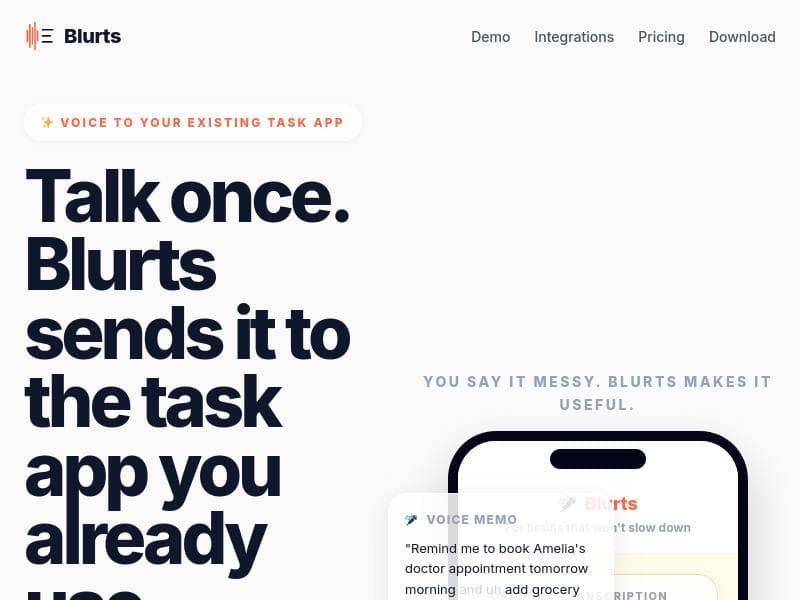
Description
Blurts-Voice to Any Task App harnesses AI to transform your spoken thoughts into organized tasks with dates and priorities, syncing automatically to your favorite productivity tools. Ideal for busy professionals and parents, it slashes task entry time from 45 seconds to just 8, making task management effortless and lightning-fast.
Blurts-Voice to Any Task App is an innovative productivity tool designed to transform the way individuals capture and manage their tasks using AI-powered voice recognition and automation. At its core, Blurts enables users to quickly record their thoughts or to-dos verbally, then leverages artificial intelligence to clean up the input by removing filler words and extracting actionable tasks. It automatically identifies key details such as deadlines, categories, and priority levels, streamlining the process of task creation and organization. This tool is particularly valuable for busy professionals, parents, and anyone who struggles to keep up with jotting down tasks manually due to time constraints or the fast pace of their daily lives. The app was developed by a husband-and-wife team juggling full-time jobs and parenting, which underscores its focus on efficiency and simplicity in task management. Key features of Blurts include rapid voice capture, which allows users to record their thoughts before they are forgotten, significantly reducing the friction of task entry. The AI-powered cleaning process intelligently parses the recorded audio to strip out unnecessary filler words and extract meaningful task information such as due dates, categories, and priorities. This automation not only saves time but also enhances task clarity and organization. Another standout capability is its seamless synchronization with popular productivity tools such as Notion, Google Tasks, Google Calendar, Apple Reminders, and Apple Calendar. This integration ensures that tasks captured in Blurts are automatically sent to the user’s preferred platforms, eliminating the need for manual data entry and keeping all task lists up to date across devices. By cutting down task entry time from an average of 45 seconds to just 8 seconds, Blurts significantly boosts productivity and helps users maintain focus on their priorities. Blurts is best suited for individuals who need a fast, reliable way to capture and organize tasks on the go. This includes busy professionals who attend numerous meetings and need to quickly record action items, parents managing household and family schedules, and anyone who prefers voice input over typing. Specific use cases include capturing meeting notes and converting them into actionable tasks, managing personal and work-related to-dos, and syncing reminders across multiple calendars and task management apps. Its ability to assign dates and priorities automatically makes it ideal for users who want to reduce cognitive load and streamline their workflow. The app operates on a paid pricing model, reflecting its advanced AI capabilities and integration features. While specific pricing details are not provided in the source, users can expect a subscription-based plan that offers full access to voice-to-task conversion, AI cleaning, and multi-platform syncing. This investment is justified by the substantial time savings and productivity gains users experience. Compared to alternatives, Blurts stands out due to its focus on voice input combined with AI-driven task extraction and automatic syncing. Many task management apps require manual entry or lack robust voice recognition and natural language processing features. Blurts’ ability to reduce task entry time dramatically and its seamless integration with widely used productivity tools make it a compelling choice for users seeking an efficient, voice-first task management solution. However, users should consider that it is a paid app, which may be a limitation for those seeking free options. Additionally, its effectiveness depends on the accuracy of voice recognition and AI parsing, which may vary based on speech clarity and language nuances. In summary, Blurts-Voice to Any Task App is a powerful AI-driven tool designed to capture, clean, and organize tasks from voice input quickly and efficiently. Its integration with major productivity platforms and focus on reducing task entry time make it an excellent choice for busy individuals looking to streamline their task management process. While it requires a paid subscription, the time saved and improved organization can offer significant value to its users.

Description
Blurts-Voice to Any Task App harnesses AI to transform your spoken thoughts into organized tasks with dates and priorities, syncing automatically to your favorite productivity tools. Ideal for busy professionals and parents, it slashes task entry time from 45 seconds to just 8, making task management effortless and lightning-fast.
Blurts-Voice to Any Task App is an innovative productivity tool designed to transform the way individuals capture and manage their tasks using AI-powered voice recognition and automation. At its core, Blurts enables users to quickly record their thoughts or to-dos verbally, then leverages artificial intelligence to clean up the input by removing filler words and extracting actionable tasks. It automatically identifies key details such as deadlines, categories, and priority levels, streamlining the process of task creation and organization. This tool is particularly valuable for busy professionals, parents, and anyone who struggles to keep up with jotting down tasks manually due to time constraints or the fast pace of their daily lives. The app was developed by a husband-and-wife team juggling full-time jobs and parenting, which underscores its focus on efficiency and simplicity in task management. Key features of Blurts include rapid voice capture, which allows users to record their thoughts before they are forgotten, significantly reducing the friction of task entry. The AI-powered cleaning process intelligently parses the recorded audio to strip out unnecessary filler words and extract meaningful task information such as due dates, categories, and priorities. This automation not only saves time but also enhances task clarity and organization. Another standout capability is its seamless synchronization with popular productivity tools such as Notion, Google Tasks, Google Calendar, Apple Reminders, and Apple Calendar. This integration ensures that tasks captured in Blurts are automatically sent to the user’s preferred platforms, eliminating the need for manual data entry and keeping all task lists up to date across devices. By cutting down task entry time from an average of 45 seconds to just 8 seconds, Blurts significantly boosts productivity and helps users maintain focus on their priorities. Blurts is best suited for individuals who need a fast, reliable way to capture and organize tasks on the go. This includes busy professionals who attend numerous meetings and need to quickly record action items, parents managing household and family schedules, and anyone who prefers voice input over typing. Specific use cases include capturing meeting notes and converting them into actionable tasks, managing personal and work-related to-dos, and syncing reminders across multiple calendars and task management apps. Its ability to assign dates and priorities automatically makes it ideal for users who want to reduce cognitive load and streamline their workflow. The app operates on a paid pricing model, reflecting its advanced AI capabilities and integration features. While specific pricing details are not provided in the source, users can expect a subscription-based plan that offers full access to voice-to-task conversion, AI cleaning, and multi-platform syncing. This investment is justified by the substantial time savings and productivity gains users experience. Compared to alternatives, Blurts stands out due to its focus on voice input combined with AI-driven task extraction and automatic syncing. Many task management apps require manual entry or lack robust voice recognition and natural language processing features. Blurts’ ability to reduce task entry time dramatically and its seamless integration with widely used productivity tools make it a compelling choice for users seeking an efficient, voice-first task management solution. However, users should consider that it is a paid app, which may be a limitation for those seeking free options. Additionally, its effectiveness depends on the accuracy of voice recognition and AI parsing, which may vary based on speech clarity and language nuances. In summary, Blurts-Voice to Any Task App is a powerful AI-driven tool designed to capture, clean, and organize tasks from voice input quickly and efficiently. Its integration with major productivity platforms and focus on reducing task entry time make it an excellent choice for busy individuals looking to streamline their task management process. While it requires a paid subscription, the time saved and improved organization can offer significant value to its users.
Tool Features
- Capture fast: Record the thought before it disappears
- AI cleans it: Extracts tasks, dates, categories, and priority
- Sends it out: Syncs to the tools you already use
- Syncs with Notion, Google Tasks, Google Calendar, Apple Reminders, and Apple Calendar
- Reduces task entry time from ~45 seconds to ~8 seconds
Frequently Asked Questions
What is Blurts-Voice to Any Task App?
Blurts-Voice to Any Task App is an AI-powered productivity tool that converts voice recordings into organized tasks by stripping filler words, extracting dates, categories, and priorities, and syncing them automatically to various task management and calendar apps.
How much does Blurts-Voice to Any Task App cost?
Blurts operates on a paid subscription model. While exact pricing details are not specified, users can expect to pay for access to its AI-driven voice-to-task conversion and integration features.
Who is Blurts-Voice to Any Task App best for?
Blurts is ideal for busy professionals, parents, and anyone who needs a fast, efficient way to capture and organize tasks using voice input, especially those who want to reduce manual task entry time and keep their productivity tools in sync.
What are the main features of Blurts-Voice to Any Task App?
Key features include rapid voice capture, AI-powered cleaning that removes filler words and extracts task details, automatic assignment of dates, categories, and priorities, and seamless syncing with Notion, Google Tasks, Google Calendar, Apple Reminders, and Apple Calendar.
Does Blurts-Voice to Any Task App offer a free trial?
The provided information does not specify whether Blurts offers a free trial. Interested users should visit the official website to check for any trial options or demos.
What integrations does Blurts-Voice to Any Task App support?
Blurts supports integration with major productivity platforms including Notion, Google Tasks, Google Calendar, Apple Reminders, and Apple Calendar, allowing automatic syncing of tasks and reminders.
How does Blurts-Voice to Any Task App work?
Users record their thoughts or tasks via voice; the AI then processes the audio to remove filler words and extract actionable tasks along with relevant details like due dates and priorities. These tasks are then automatically synced to the user's preferred productivity apps, streamlining task management.
Socials
Use ToolSponsored Tools













































Reviews
No reviews yet. Be the first to share your experience.
















