Description
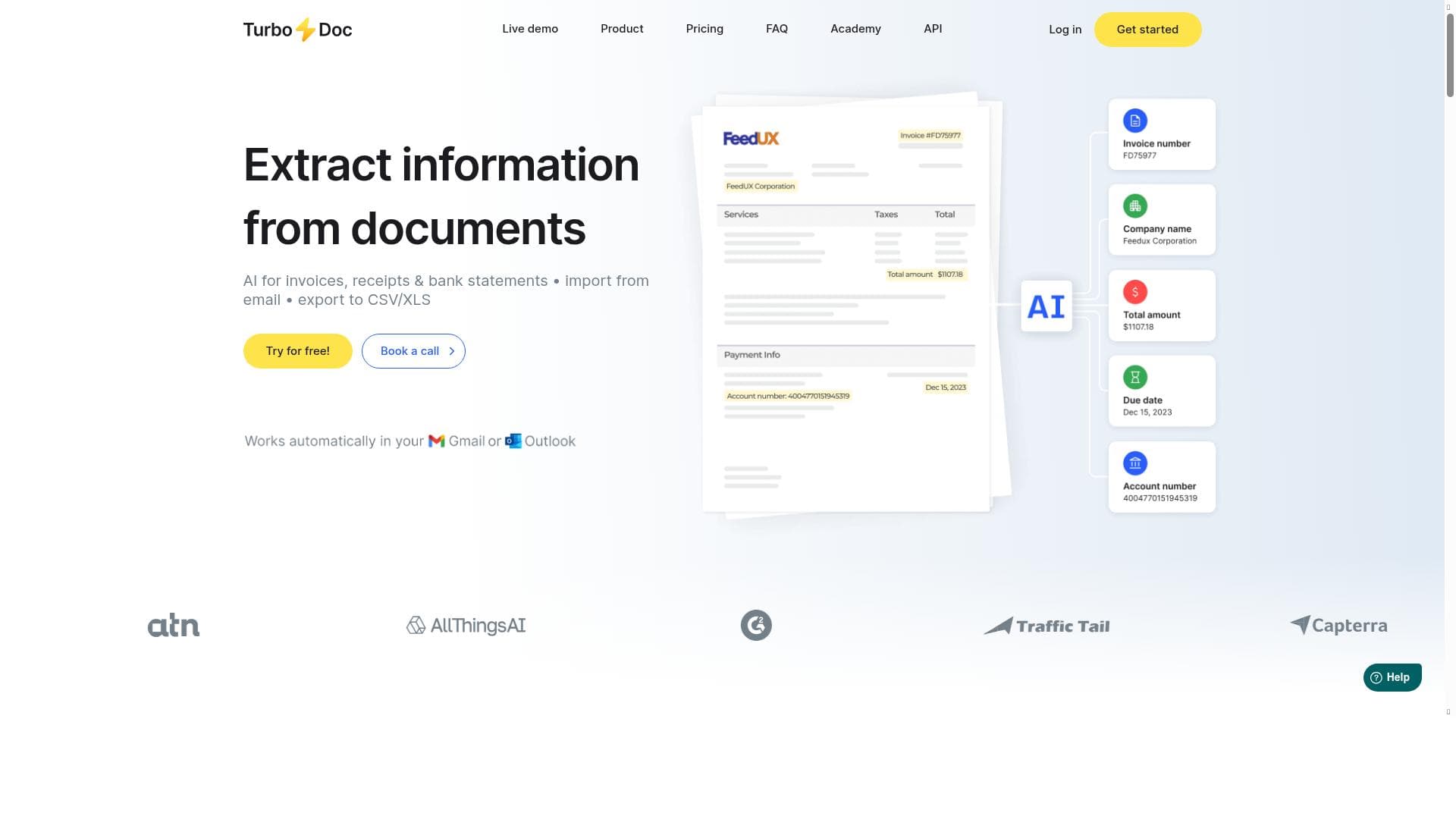
TurboDoc leverages advanced AI-powered OCR technology to automate invoice and receipt processing, transforming unstructured documents into accurate, structured data instantly. Ideal for businesses aiming to reduce manual errors and accelerate accounts payable workflows, TurboDoc saves time and streamlines financial operations with intelligent automation.
TurboDoc is an advanced optical character recognition (OCR) tool designed specifically to automate the processing of invoices and receipts using artificial intelligence. Its core purpose is to streamline and simplify the traditionally tedious and error-prone task of manually handling diverse document formats. Businesses often receive invoices and receipts in various layouts and file types, making manual data entry time-consuming and susceptible to mistakes that can lead to financial losses and operational delays. TurboDoc addresses these challenges by leveraging a sophisticated AI model trained on a vast corpus of documents, enabling it to quickly and accurately extract structured data from unstructured invoice and receipt formats. This automation not only reduces human error but also accelerates the entire accounts payable workflow, saving valuable time and resources. The key features of TurboDoc revolve around its AI-driven invoice processing capabilities. It intelligently interprets and transforms unstructured documents into standardized, structured data that can be easily integrated into accounting and enterprise resource planning (ERP) systems. This includes extracting critical information such as vendor details, invoice numbers, dates, line items, totals, and tax information. The tool’s intelligent document processing engine is capable of handling a wide variety of invoice templates and receipt formats, adapting to new document types without requiring extensive manual configuration. Additionally, TurboDoc offers automation tools for invoice management, enabling users to set up workflows that automatically route, validate, and approve invoices, further reducing manual intervention and accelerating payment cycles. TurboDoc is best suited for small to medium-sized businesses, accounting firms, and finance departments within larger enterprises that deal with high volumes of invoices and receipts. It is particularly valuable for organizations seeking to reduce administrative overhead, minimize errors in financial data entry, and improve cash flow management through faster invoice processing. Use cases include automating accounts payable operations, streamlining expense management, and enhancing audit readiness by maintaining accurate and easily accessible financial records. Its ability to handle diverse document formats also makes it ideal for businesses operating in industries with complex invoicing requirements or multiple vendors. Regarding pricing, TurboDoc offers a freemium model, allowing users to access basic features at no cost, which is ideal for smaller businesses or those wanting to evaluate the tool before committing financially. Paid plans likely provide access to advanced features, higher processing volumes, and enhanced support, although specific pricing tiers and details would need to be confirmed on their website. This pricing approach makes TurboDoc accessible to a wide range of users, from startups to established enterprises. Compared to alternative OCR and invoice processing solutions, TurboDoc stands out due to its AI-powered accuracy and adaptability. Many traditional OCR tools require manual template setup and struggle with diverse document layouts, whereas TurboDoc’s AI model continuously learns and improves from a large dataset, providing more reliable data extraction across various invoice types. Its integrated automation features also differentiate it by offering end-to-end invoice management rather than just data capture. However, users should consider that, like all AI-based tools, initial setup and integration may require some technical effort, and performance can vary depending on document quality and complexity. Notable limitations include potential challenges with extremely poor-quality scans or handwritten documents, which remain difficult for most OCR technologies. Additionally, while the freemium model is attractive, advanced features and higher processing limits may require paid subscriptions, which could be a consideration for budget-conscious users. Integration capabilities with existing financial software and ERP systems should be verified to ensure seamless workflow incorporation. Overall, TurboDoc provides a powerful, AI-driven solution for automating invoice and receipt processing, significantly reducing manual workload and improving accuracy for finance teams.

Description
TurboDoc leverages advanced AI-powered OCR technology to automate invoice and receipt processing, transforming unstructured documents into accurate, structured data instantly. Ideal for businesses aiming to reduce manual errors and accelerate accounts payable workflows, TurboDoc saves time and streamlines financial operations with intelligent automation.
TurboDoc is an advanced optical character recognition (OCR) tool designed specifically to automate the processing of invoices and receipts using artificial intelligence. Its core purpose is to streamline and simplify the traditionally tedious and error-prone task of manually handling diverse document formats. Businesses often receive invoices and receipts in various layouts and file types, making manual data entry time-consuming and susceptible to mistakes that can lead to financial losses and operational delays. TurboDoc addresses these challenges by leveraging a sophisticated AI model trained on a vast corpus of documents, enabling it to quickly and accurately extract structured data from unstructured invoice and receipt formats. This automation not only reduces human error but also accelerates the entire accounts payable workflow, saving valuable time and resources. The key features of TurboDoc revolve around its AI-driven invoice processing capabilities. It intelligently interprets and transforms unstructured documents into standardized, structured data that can be easily integrated into accounting and enterprise resource planning (ERP) systems. This includes extracting critical information such as vendor details, invoice numbers, dates, line items, totals, and tax information. The tool’s intelligent document processing engine is capable of handling a wide variety of invoice templates and receipt formats, adapting to new document types without requiring extensive manual configuration. Additionally, TurboDoc offers automation tools for invoice management, enabling users to set up workflows that automatically route, validate, and approve invoices, further reducing manual intervention and accelerating payment cycles. TurboDoc is best suited for small to medium-sized businesses, accounting firms, and finance departments within larger enterprises that deal with high volumes of invoices and receipts. It is particularly valuable for organizations seeking to reduce administrative overhead, minimize errors in financial data entry, and improve cash flow management through faster invoice processing. Use cases include automating accounts payable operations, streamlining expense management, and enhancing audit readiness by maintaining accurate and easily accessible financial records. Its ability to handle diverse document formats also makes it ideal for businesses operating in industries with complex invoicing requirements or multiple vendors. Regarding pricing, TurboDoc offers a freemium model, allowing users to access basic features at no cost, which is ideal for smaller businesses or those wanting to evaluate the tool before committing financially. Paid plans likely provide access to advanced features, higher processing volumes, and enhanced support, although specific pricing tiers and details would need to be confirmed on their website. This pricing approach makes TurboDoc accessible to a wide range of users, from startups to established enterprises. Compared to alternative OCR and invoice processing solutions, TurboDoc stands out due to its AI-powered accuracy and adaptability. Many traditional OCR tools require manual template setup and struggle with diverse document layouts, whereas TurboDoc’s AI model continuously learns and improves from a large dataset, providing more reliable data extraction across various invoice types. Its integrated automation features also differentiate it by offering end-to-end invoice management rather than just data capture. However, users should consider that, like all AI-based tools, initial setup and integration may require some technical effort, and performance can vary depending on document quality and complexity. Notable limitations include potential challenges with extremely poor-quality scans or handwritten documents, which remain difficult for most OCR technologies. Additionally, while the freemium model is attractive, advanced features and higher processing limits may require paid subscriptions, which could be a consideration for budget-conscious users. Integration capabilities with existing financial software and ERP systems should be verified to ensure seamless workflow incorporation. Overall, TurboDoc provides a powerful, AI-driven solution for automating invoice and receipt processing, significantly reducing manual workload and improving accuracy for finance teams.
Tool Features
- AI-driven invoice processing
- Intelligent document processing
- Transforms unstructured invoices and receipts into structured data
- Saves time on paperwork
- Automation tools for invoice management
Frequently Asked Questions
What is TurboDoc?
TurboDoc is an AI-driven optical character recognition tool designed to automate the processing of invoices and receipts by extracting structured data from various document formats, reducing manual effort and errors.
How much does TurboDoc cost?
TurboDoc offers a freemium pricing model, allowing users to access basic features for free, with paid plans available for advanced features and higher processing volumes. Specific pricing details can be found on their website.
Who is TurboDoc best for?
TurboDoc is ideal for small to medium-sized businesses, accounting firms, and finance departments that handle large volumes of invoices and receipts and want to automate data entry and invoice management.
What are the main features of TurboDoc?
Key features include AI-driven invoice processing, intelligent document processing, transformation of unstructured invoices and receipts into structured data, time-saving automation tools for invoice management, and support for diverse document formats.
Does TurboDoc offer a free trial?
Yes, TurboDoc provides a freemium plan that allows users to try basic features at no cost, which serves as a free trial to evaluate the tool before upgrading to paid plans.
What integrations does TurboDoc support?
While specific integrations are not detailed, TurboDoc is designed to export structured data compatible with accounting and ERP systems. Users should check the website or contact support for detailed integration options.
How does TurboDoc work?
TurboDoc uses an advanced AI model trained on a large corpus of documents to recognize and extract key information from invoices and receipts in various formats, converting unstructured data into accurate, structured formats for easy processing and automation.
Socials
Use ToolSponsored Tools













































Reviews
No reviews yet. Be the first to share your experience.
















