Description
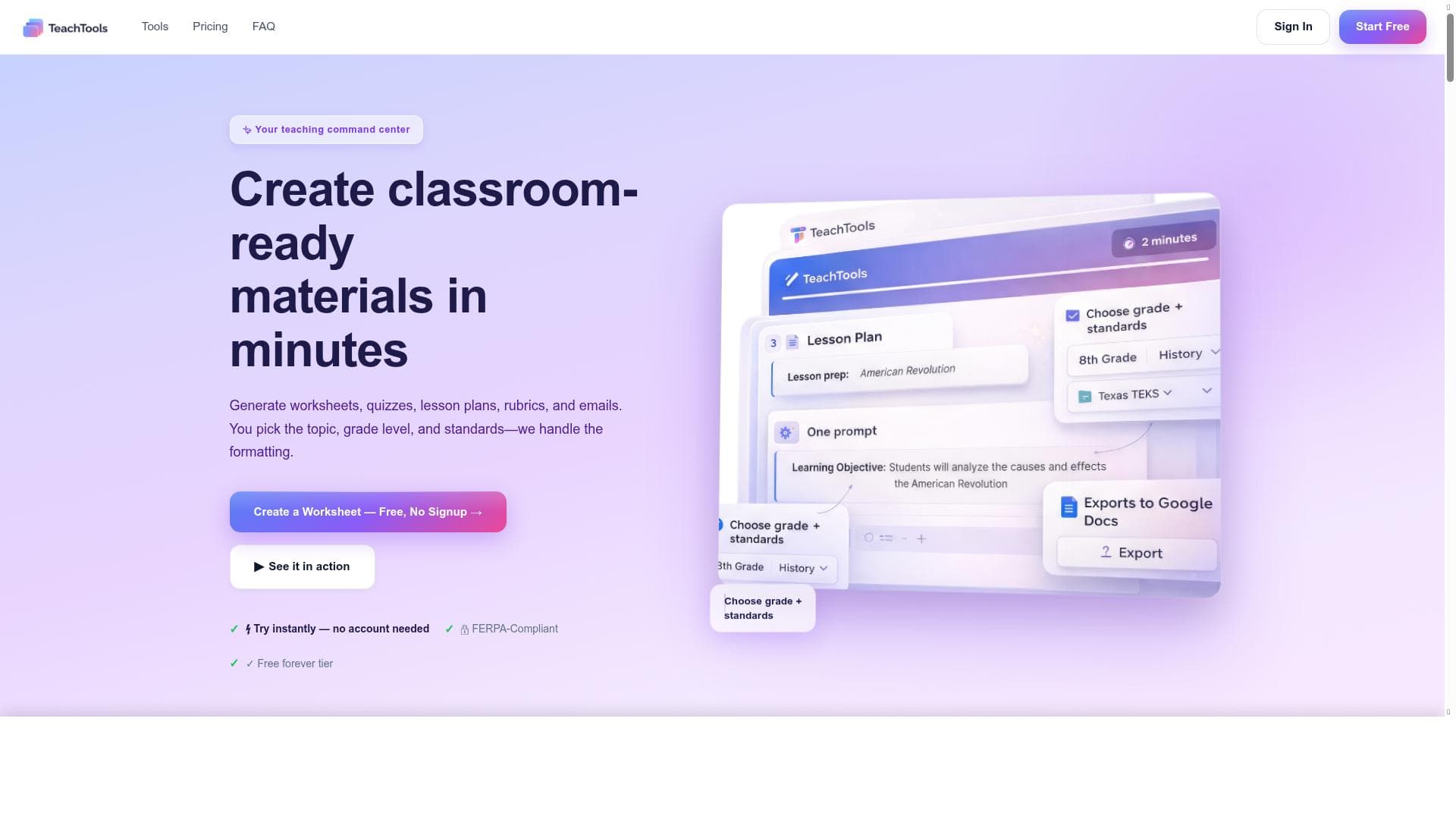
TeachTools is a powerful all-in-one teaching command center that enables educators to create professional worksheets, quizzes, and lesson plans in seconds, combining 24 tools into one seamless platform. Ideal for teachers seeking to save hours on preparation while retaining full control over their materials, TeachTools transforms lesson planning into a fast, efficient, and customizable process.
TeachTools is an all-in-one teaching command center designed to revolutionize the way educators prepare and deliver their instructional materials. Its core purpose is to streamline the creation of professional-quality worksheets, quizzes, and lesson plans, enabling teachers to save significant amounts of time while maintaining full creative and pedagogical control. By integrating 24 distinct teaching tools into a single cohesive platform, TeachTools addresses multiple facets of lesson preparation, from content generation to assessment creation, making it an indispensable resource for modern educators. At the heart of TeachTools is its ability to rapidly generate professional worksheets and quizzes. Educators can produce customized, high-quality materials in seconds, a process that traditionally takes hours. The platform’s intuitive interface allows users to select from a variety of question types, formats, and difficulty levels, tailoring content to diverse student needs. Beyond worksheets and quizzes, TeachTools offers comprehensive lesson planning capabilities, enabling teachers to organize their curriculum efficiently and cohesively. The inclusion of 24 integrated tools means that users can access resources such as interactive activities, flashcards, and progress tracking without switching platforms, significantly enhancing workflow efficiency. TeachTools is best suited for K-12 teachers, homeschooling parents, tutors, and educational institutions looking to optimize lesson preparation. Specific use cases include creating differentiated instruction materials for mixed-ability classrooms, quickly generating formative assessments to gauge student understanding, and developing detailed lesson plans aligned with curriculum standards. Its versatility also supports remote and hybrid learning environments, where rapid adaptation and resource creation are critical. By consolidating multiple teaching functions into one platform, TeachTools empowers educators to focus more on instruction and less on administrative tasks. Regarding pricing, TeachTools operates on a paid subscription model. While exact pricing tiers are not publicly detailed, the investment reflects the platform’s comprehensive feature set and time-saving benefits. Potential users are encouraged to visit the official website for the most current pricing information and to explore any available demos or introductory offers. The paid model ensures continuous updates, customer support, and access to the full suite of teaching tools, making it a valuable investment for educators committed to enhancing their instructional efficiency. Compared to alternative solutions, TeachTools stands out by combining an extensive array of teaching tools within a single platform, whereas many competitors offer only isolated functionalities such as quiz creation or lesson planning. This integration reduces the need for multiple subscriptions and minimizes the learning curve associated with juggling different software. Additionally, TeachTools emphasizes user control over content, avoiding overly automated or generic outputs that may not align with specific teaching goals. However, some competitors may offer free tiers or more specialized tools for niche educational needs, which could be a consideration for budget-conscious users or those seeking highly specialized features. Notable limitations of TeachTools include its paid-only access, which may be a barrier for educators with limited budgets. Additionally, while the platform boasts 24 integrated tools, users may encounter a learning curve when first navigating the breadth of features. Integration with external learning management systems (LMS) or third-party educational apps is not explicitly detailed, which could impact seamless workflow for some institutions. Lastly, as with any AI-assisted tool, the quality of generated content may require teacher review and customization to ensure alignment with specific curriculum standards and student needs. Overall, TeachTools offers a powerful, time-saving solution for educators willing to invest in a comprehensive teaching assistant platform.
Description
TeachTools is a powerful all-in-one teaching command center that enables educators to create professional worksheets, quizzes, and lesson plans in seconds, combining 24 tools into one seamless platform. Ideal for teachers seeking to save hours on preparation while retaining full control over their materials, TeachTools transforms lesson planning into a fast, efficient, and customizable process.
TeachTools is an all-in-one teaching command center designed to revolutionize the way educators prepare and deliver their instructional materials. Its core purpose is to streamline the creation of professional-quality worksheets, quizzes, and lesson plans, enabling teachers to save significant amounts of time while maintaining full creative and pedagogical control. By integrating 24 distinct teaching tools into a single cohesive platform, TeachTools addresses multiple facets of lesson preparation, from content generation to assessment creation, making it an indispensable resource for modern educators. At the heart of TeachTools is its ability to rapidly generate professional worksheets and quizzes. Educators can produce customized, high-quality materials in seconds, a process that traditionally takes hours. The platform’s intuitive interface allows users to select from a variety of question types, formats, and difficulty levels, tailoring content to diverse student needs. Beyond worksheets and quizzes, TeachTools offers comprehensive lesson planning capabilities, enabling teachers to organize their curriculum efficiently and cohesively. The inclusion of 24 integrated tools means that users can access resources such as interactive activities, flashcards, and progress tracking without switching platforms, significantly enhancing workflow efficiency. TeachTools is best suited for K-12 teachers, homeschooling parents, tutors, and educational institutions looking to optimize lesson preparation. Specific use cases include creating differentiated instruction materials for mixed-ability classrooms, quickly generating formative assessments to gauge student understanding, and developing detailed lesson plans aligned with curriculum standards. Its versatility also supports remote and hybrid learning environments, where rapid adaptation and resource creation are critical. By consolidating multiple teaching functions into one platform, TeachTools empowers educators to focus more on instruction and less on administrative tasks. Regarding pricing, TeachTools operates on a paid subscription model. While exact pricing tiers are not publicly detailed, the investment reflects the platform’s comprehensive feature set and time-saving benefits. Potential users are encouraged to visit the official website for the most current pricing information and to explore any available demos or introductory offers. The paid model ensures continuous updates, customer support, and access to the full suite of teaching tools, making it a valuable investment for educators committed to enhancing their instructional efficiency. Compared to alternative solutions, TeachTools stands out by combining an extensive array of teaching tools within a single platform, whereas many competitors offer only isolated functionalities such as quiz creation or lesson planning. This integration reduces the need for multiple subscriptions and minimizes the learning curve associated with juggling different software. Additionally, TeachTools emphasizes user control over content, avoiding overly automated or generic outputs that may not align with specific teaching goals. However, some competitors may offer free tiers or more specialized tools for niche educational needs, which could be a consideration for budget-conscious users or those seeking highly specialized features. Notable limitations of TeachTools include its paid-only access, which may be a barrier for educators with limited budgets. Additionally, while the platform boasts 24 integrated tools, users may encounter a learning curve when first navigating the breadth of features. Integration with external learning management systems (LMS) or third-party educational apps is not explicitly detailed, which could impact seamless workflow for some institutions. Lastly, as with any AI-assisted tool, the quality of generated content may require teacher review and customization to ensure alignment with specific curriculum standards and student needs. Overall, TeachTools offers a powerful, time-saving solution for educators willing to invest in a comprehensive teaching assistant platform.
Tool Features
- Create professional worksheets quickly
- Generate quizzes in seconds
- Access 24 teaching tools in one platform
- Save hours on lesson preparation
- Maintain control over teaching materials
Frequently Asked Questions
What is TeachTools?
TeachTools is a comprehensive teaching platform that allows educators to quickly create professional worksheets, quizzes, and lesson plans by combining 24 teaching tools into one easy-to-use interface.
How much does TeachTools cost?
TeachTools operates on a paid subscription model. Specific pricing details are available on their official website, and the subscription grants full access to all features and tools.
Who is TeachTools best for?
TeachTools is ideal for K-12 teachers, homeschooling parents, tutors, and educational institutions looking to streamline lesson preparation and create customized teaching materials efficiently.
What are the main features of TeachTools?
Key features include rapid creation of professional worksheets, instant quiz generation, access to 24 integrated teaching tools, significant time savings on lesson preparation, and full control over educational content.
Does TeachTools offer a free trial?
Information about a free trial is not explicitly provided; interested users should visit the TeachTools website to check for any available demos or introductory offers.
What integrations does TeachTools support?
TeachTools consolidates 24 teaching tools within its own platform, but specific integrations with external learning management systems or third-party apps are not clearly detailed.
How does TeachTools work?
TeachTools works by providing educators with a unified platform where they can quickly generate worksheets, quizzes, and lesson plans using AI-powered tools and customizable templates, streamlining the entire lesson preparation process.
Socials
Use ToolSponsored Tools













































Reviews
No reviews yet. Be the first to share your experience.