Service Watch
Description
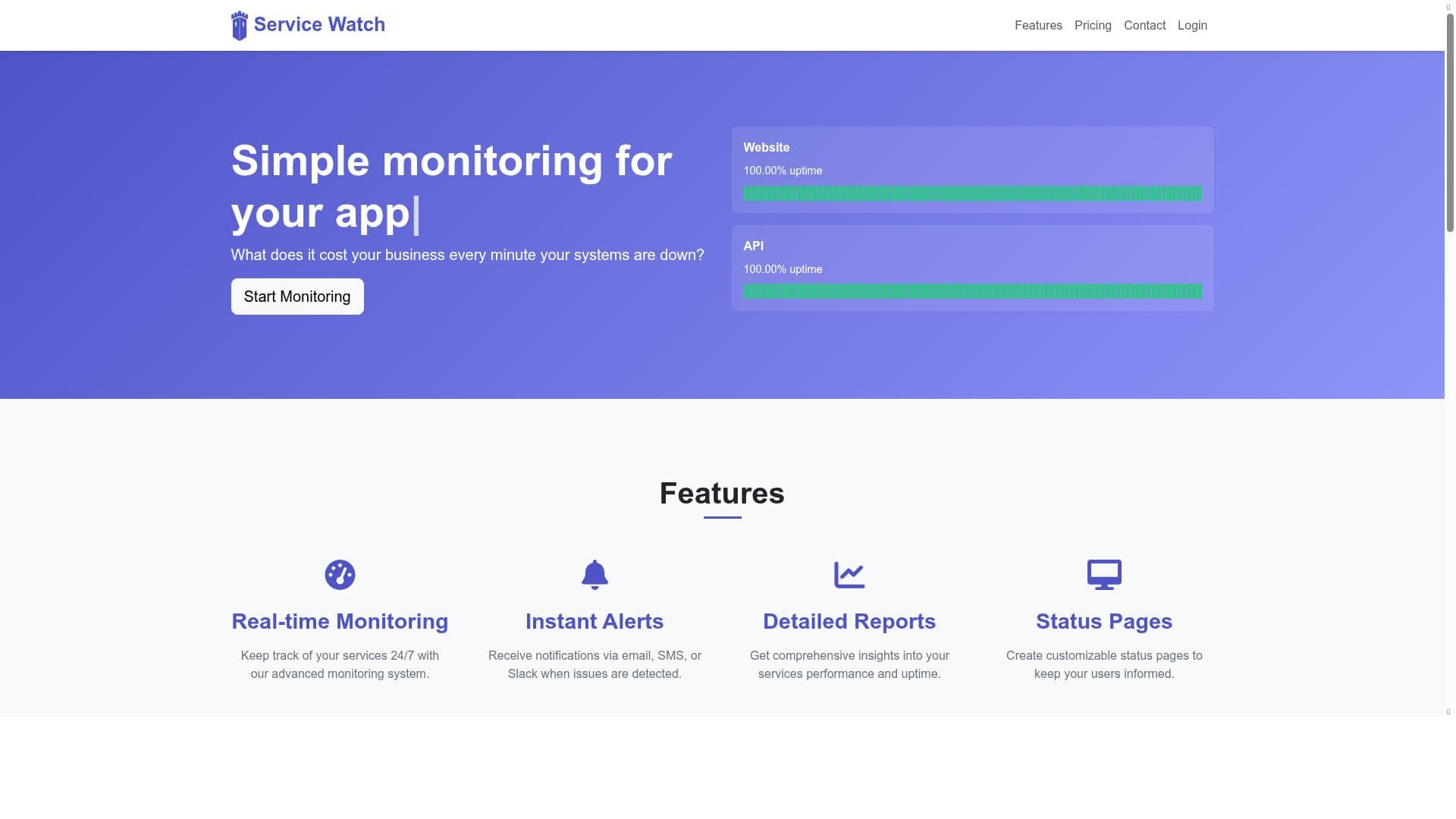
Service Watch is a versatile monitoring tool that ensures your websites, APIs, web services, and cron jobs stay up and running with real-time alerts across multiple channels like email, SMS, Slack, and more. Ideal for businesses and developers seeking a simple yet powerful way to track uptime and respond quickly to issues, it combines ease of use with comprehensive monitoring capabilities.
Service Watch is a robust and comprehensive monitoring platform designed to keep track of websites, APIs, web services, cron jobs, and other internet-connected systems. Its core purpose is to provide real-time monitoring and alerting to ensure that your critical services remain operational and performant. By continuously checking the status of your online assets, Service Watch helps businesses and developers quickly identify outages, performance issues, or failures, minimizing downtime and improving reliability. This proactive approach to monitoring is essential in today’s digital landscape where service availability directly impacts user experience and business reputation. One of the standout features of Service Watch is its broad monitoring capabilities. It supports a wide range of targets including websites, APIs, web services, and scheduled tasks like cron jobs, making it a versatile tool for various technical environments. The platform tracks uptime percentages, providing clear metrics on service reliability over time. Users can view visual uptime history through intuitive graphs and dashboards, allowing for easy trend analysis and reporting. The interface is designed to be simple and user-friendly, enabling both technical and non-technical users to set up and manage monitoring tasks without steep learning curves. Alerting is a critical component of Service Watch. It offers multiple notification channels such as email, SMS, Slack, Discord, and Telegram, ensuring that users receive timely alerts through their preferred communication platforms. This multi-channel approach helps teams respond quickly to incidents, reducing mean time to resolution. Additionally, Service Watch is actively expanding its notification options, demonstrating a commitment to flexibility and user feedback. If a specific alert channel is needed, users are encouraged to reach out, highlighting the tool’s customer-centric development philosophy. Service Watch is ideal for a wide range of users including small to medium businesses, SaaS providers, DevOps teams, and IT professionals who need reliable monitoring without the complexity or cost of enterprise-grade solutions. It is particularly useful for those managing multiple services or APIs where uptime and performance are critical. For example, a startup running several web services can use Service Watch to monitor each endpoint and receive instant alerts if any service goes down. Similarly, developers managing cron jobs can ensure scheduled tasks execute as expected, preventing silent failures. The pricing model for Service Watch is freemium, allowing users to start monitoring their services at no cost with basic features. This approach lowers the barrier to entry and enables users to evaluate the tool’s capabilities before committing to paid plans. While specific pricing tiers and limits are not detailed, the freemium model typically includes options to upgrade for additional monitors, advanced reporting, or more frequent checks. This flexible pricing structure makes Service Watch accessible to startups and growing businesses alike. Compared to alternatives, Service Watch stands out for its ease of use and broad notification support. Many monitoring tools focus exclusively on website uptime or API health, but Service Watch’s inclusion of cron job monitoring and multiple alert channels provides a more holistic monitoring solution. Its user-friendly interface contrasts with some complex enterprise tools, making it suitable for teams without dedicated monitoring specialists. However, it may lack some advanced features found in premium enterprise platforms, such as deep analytics, synthetic transaction monitoring, or AI-driven anomaly detection. One consideration is that while Service Watch covers essential monitoring needs, organizations with highly complex infrastructures or stringent compliance requirements might require more specialized solutions. Additionally, as the platform is continuously evolving, certain niche integrations or notification channels might not yet be available, though the team is open to user requests. Overall, Service Watch offers a balanced mix of functionality, simplicity, and affordability, making it a strong choice for businesses seeking reliable service monitoring with flexible alerting options.

Description
Service Watch is a versatile monitoring tool that ensures your websites, APIs, web services, and cron jobs stay up and running with real-time alerts across multiple channels like email, SMS, Slack, and more. Ideal for businesses and developers seeking a simple yet powerful way to track uptime and respond quickly to issues, it combines ease of use with comprehensive monitoring capabilities.
Service Watch is a robust and comprehensive monitoring platform designed to keep track of websites, APIs, web services, cron jobs, and other internet-connected systems. Its core purpose is to provide real-time monitoring and alerting to ensure that your critical services remain operational and performant. By continuously checking the status of your online assets, Service Watch helps businesses and developers quickly identify outages, performance issues, or failures, minimizing downtime and improving reliability. This proactive approach to monitoring is essential in today’s digital landscape where service availability directly impacts user experience and business reputation. One of the standout features of Service Watch is its broad monitoring capabilities. It supports a wide range of targets including websites, APIs, web services, and scheduled tasks like cron jobs, making it a versatile tool for various technical environments. The platform tracks uptime percentages, providing clear metrics on service reliability over time. Users can view visual uptime history through intuitive graphs and dashboards, allowing for easy trend analysis and reporting. The interface is designed to be simple and user-friendly, enabling both technical and non-technical users to set up and manage monitoring tasks without steep learning curves. Alerting is a critical component of Service Watch. It offers multiple notification channels such as email, SMS, Slack, Discord, and Telegram, ensuring that users receive timely alerts through their preferred communication platforms. This multi-channel approach helps teams respond quickly to incidents, reducing mean time to resolution. Additionally, Service Watch is actively expanding its notification options, demonstrating a commitment to flexibility and user feedback. If a specific alert channel is needed, users are encouraged to reach out, highlighting the tool’s customer-centric development philosophy. Service Watch is ideal for a wide range of users including small to medium businesses, SaaS providers, DevOps teams, and IT professionals who need reliable monitoring without the complexity or cost of enterprise-grade solutions. It is particularly useful for those managing multiple services or APIs where uptime and performance are critical. For example, a startup running several web services can use Service Watch to monitor each endpoint and receive instant alerts if any service goes down. Similarly, developers managing cron jobs can ensure scheduled tasks execute as expected, preventing silent failures. The pricing model for Service Watch is freemium, allowing users to start monitoring their services at no cost with basic features. This approach lowers the barrier to entry and enables users to evaluate the tool’s capabilities before committing to paid plans. While specific pricing tiers and limits are not detailed, the freemium model typically includes options to upgrade for additional monitors, advanced reporting, or more frequent checks. This flexible pricing structure makes Service Watch accessible to startups and growing businesses alike. Compared to alternatives, Service Watch stands out for its ease of use and broad notification support. Many monitoring tools focus exclusively on website uptime or API health, but Service Watch’s inclusion of cron job monitoring and multiple alert channels provides a more holistic monitoring solution. Its user-friendly interface contrasts with some complex enterprise tools, making it suitable for teams without dedicated monitoring specialists. However, it may lack some advanced features found in premium enterprise platforms, such as deep analytics, synthetic transaction monitoring, or AI-driven anomaly detection. One consideration is that while Service Watch covers essential monitoring needs, organizations with highly complex infrastructures or stringent compliance requirements might require more specialized solutions. Additionally, as the platform is continuously evolving, certain niche integrations or notification channels might not yet be available, though the team is open to user requests. Overall, Service Watch offers a balanced mix of functionality, simplicity, and affordability, making it a strong choice for businesses seeking reliable service monitoring with flexible alerting options.
Tool Features
- Monitoring for websites, APIs, web services, and cron jobs
- Uptime percentage tracking
- Visual uptime history display
- Simple and user-friendly interface
- Alerts and notifications for system status changes
Frequently Asked Questions
What is Service Watch?
Service Watch is a comprehensive monitoring tool designed to track the uptime and performance of websites, APIs, web services, and cron jobs, providing real-time alerts and detailed reports to ensure your services operate smoothly.
How much does Service Watch cost?
Service Watch offers a freemium pricing model, allowing users to access basic monitoring features for free, with options to upgrade for additional monitors, advanced features, or more frequent checks.
Who is Service Watch best for?
Service Watch is ideal for small to medium businesses, SaaS providers, DevOps teams, and IT professionals who need reliable, easy-to-use monitoring for multiple internet-connected services and scheduled tasks.
What are the main features of Service Watch?
Key features include monitoring for websites, APIs, web services, and cron jobs; uptime percentage tracking; visual uptime history displays; a simple user interface; and multiple alert options such as email, SMS, Slack, Discord, and Telegram.
Does Service Watch offer a free trial?
Service Watch operates on a freemium model, which means users can start using the service with no cost and access basic features without a time-limited trial.
What integrations does Service Watch support?
Service Watch supports multiple notification integrations including email, SMS, Slack, Discord, and Telegram, with ongoing development to add more channels based on user feedback.
How does Service Watch work?
Service Watch continuously monitors your specified websites, APIs, web services, and cron jobs by performing regular checks. When it detects downtime or issues, it sends alerts through your chosen notification channels to help you respond quickly.
Sponsored Tools













































Reviews
No reviews yet. Be the first to share your experience.
















