Redlight Greenlight for Claude Code
Description
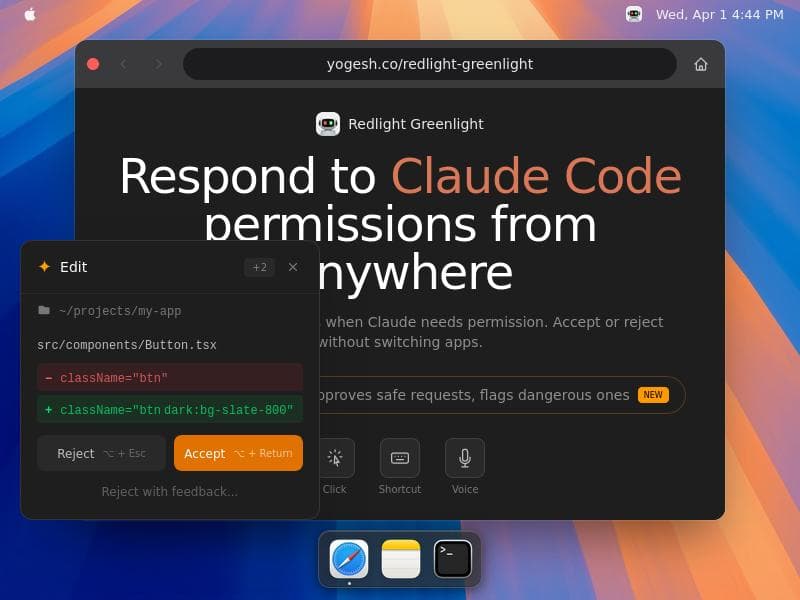
Redlight Greenlight for Claude Code is a native macOS menu bar app that revolutionizes how developers handle Claude Code permission requests by displaying them in a floating overlay. With smart automation, multi-modal responses, and security flags, it empowers users to manage permissions swiftly without leaving their workflow, making it ideal for developers and power users seeking efficiency and control.
Redlight Greenlight for Claude Code is a specialized native macOS menu bar application designed to streamline the way developers and users interact with Claude Code permission requests. Its core purpose is to provide a seamless, efficient, and secure method for handling permission prompts without the need to switch contexts or open the terminal. By displaying permission requests in a floating overlay directly on the screen, it allows users to respond quickly and intuitively, enhancing productivity and reducing workflow interruptions. This tool is particularly valuable for developers working with Claude Code who need to manage permissions frequently and want a more user-friendly interface than traditional terminal prompts. One of the standout features of Redlight Greenlight is its native integration with macOS, ensuring smooth performance and a consistent user experience within the Apple ecosystem. The floating overlay is designed to be unobtrusive yet immediately accessible, presenting permission requests clearly and allowing users to respond without leaving their current application. This overlay supports multiple input methods including mouse clicks, keyboard shortcuts, and even voice commands, catering to different user preferences and accessibility needs. Additionally, the Smart Accept feature intelligently auto-approves safe permission requests based on predefined criteria, significantly reducing the number of manual interactions required. Conversely, it flags potentially dangerous permission requests, alerting users to review these carefully before granting access, thereby enhancing security. Redlight Greenlight is ideal for developers, system administrators, and power users who frequently interact with Claude Code and require a more efficient permission management system. Use cases include software development environments where rapid iteration and testing demand quick permission handling, as well as security-conscious workflows where users need to maintain tight control over code execution privileges. Its ability to integrate voice responses and shortcuts also makes it suitable for users who prefer hands-free or keyboard-centric workflows, improving accessibility and speed. Regarding pricing, Redlight Greenlight is a paid application, reflecting its specialized functionality and native macOS integration. While specific pricing details are not publicly disclosed on the main website, interested users can visit the official site to learn more about purchasing options and any available licensing models. The investment is justified by the productivity gains and enhanced security it offers, especially for professional environments. Compared to alternatives, Redlight Greenlight stands out due to its native macOS design and its unique floating overlay approach. Many other permission management tools require switching applications or rely on less integrated notification systems, which can disrupt workflow. Its Smart Accept feature and multi-modal response options (click, shortcut, voice) provide a level of flexibility and automation not commonly found in similar tools. However, unlike some open-source or cross-platform solutions, Redlight Greenlight is macOS-exclusive, which may limit its appeal to users on other operating systems. Potential limitations include its platform exclusivity, which confines its use to macOS users only. Additionally, as a paid tool, it may not be accessible to hobbyists or casual users who prefer free solutions. Users should also consider the learning curve associated with configuring Smart Accept rules and voice commands to fully leverage the app's capabilities. Lastly, since it operates as an overlay, users with multiple monitors or unique display setups may need to verify compatibility and positioning. In summary, Redlight Greenlight for Claude Code is a powerful, user-centric tool that revolutionizes permission request handling on macOS. By combining native integration, intelligent automation, and versatile input methods, it significantly enhances developer productivity and security management when working with Claude Code. Its thoughtful design and feature set make it an excellent choice for professionals seeking an efficient, secure, and modern permission management experience.

Description
Redlight Greenlight for Claude Code is a native macOS menu bar app that revolutionizes how developers handle Claude Code permission requests by displaying them in a floating overlay. With smart automation, multi-modal responses, and security flags, it empowers users to manage permissions swiftly without leaving their workflow, making it ideal for developers and power users seeking efficiency and control.
Redlight Greenlight for Claude Code is a specialized native macOS menu bar application designed to streamline the way developers and users interact with Claude Code permission requests. Its core purpose is to provide a seamless, efficient, and secure method for handling permission prompts without the need to switch contexts or open the terminal. By displaying permission requests in a floating overlay directly on the screen, it allows users to respond quickly and intuitively, enhancing productivity and reducing workflow interruptions. This tool is particularly valuable for developers working with Claude Code who need to manage permissions frequently and want a more user-friendly interface than traditional terminal prompts. One of the standout features of Redlight Greenlight is its native integration with macOS, ensuring smooth performance and a consistent user experience within the Apple ecosystem. The floating overlay is designed to be unobtrusive yet immediately accessible, presenting permission requests clearly and allowing users to respond without leaving their current application. This overlay supports multiple input methods including mouse clicks, keyboard shortcuts, and even voice commands, catering to different user preferences and accessibility needs. Additionally, the Smart Accept feature intelligently auto-approves safe permission requests based on predefined criteria, significantly reducing the number of manual interactions required. Conversely, it flags potentially dangerous permission requests, alerting users to review these carefully before granting access, thereby enhancing security. Redlight Greenlight is ideal for developers, system administrators, and power users who frequently interact with Claude Code and require a more efficient permission management system. Use cases include software development environments where rapid iteration and testing demand quick permission handling, as well as security-conscious workflows where users need to maintain tight control over code execution privileges. Its ability to integrate voice responses and shortcuts also makes it suitable for users who prefer hands-free or keyboard-centric workflows, improving accessibility and speed. Regarding pricing, Redlight Greenlight is a paid application, reflecting its specialized functionality and native macOS integration. While specific pricing details are not publicly disclosed on the main website, interested users can visit the official site to learn more about purchasing options and any available licensing models. The investment is justified by the productivity gains and enhanced security it offers, especially for professional environments. Compared to alternatives, Redlight Greenlight stands out due to its native macOS design and its unique floating overlay approach. Many other permission management tools require switching applications or rely on less integrated notification systems, which can disrupt workflow. Its Smart Accept feature and multi-modal response options (click, shortcut, voice) provide a level of flexibility and automation not commonly found in similar tools. However, unlike some open-source or cross-platform solutions, Redlight Greenlight is macOS-exclusive, which may limit its appeal to users on other operating systems. Potential limitations include its platform exclusivity, which confines its use to macOS users only. Additionally, as a paid tool, it may not be accessible to hobbyists or casual users who prefer free solutions. Users should also consider the learning curve associated with configuring Smart Accept rules and voice commands to fully leverage the app's capabilities. Lastly, since it operates as an overlay, users with multiple monitors or unique display setups may need to verify compatibility and positioning. In summary, Redlight Greenlight for Claude Code is a powerful, user-centric tool that revolutionizes permission request handling on macOS. By combining native integration, intelligent automation, and versatile input methods, it significantly enhances developer productivity and security management when working with Claude Code. Its thoughtful design and feature set make it an excellent choice for professionals seeking an efficient, secure, and modern permission management experience.
Tool Features
- Native macOS menu bar app
- Floating overlay for permission requests
- Respond without switching apps
- Smart Accept auto-approves safe requests
- Flags dangerous permission requests
- Supports click, shortcut, and voice responses
Frequently Asked Questions
What is Redlight Greenlight for Claude Code?
Redlight Greenlight for Claude Code is a native macOS menu bar application that displays Claude Code permission requests in a floating overlay, allowing users to respond quickly without switching to the terminal.
How much does Redlight Greenlight for Claude Code cost?
Redlight Greenlight is a paid application. Specific pricing details are available on the official website, where users can find information about purchasing options and licensing.
Who is Redlight Greenlight for Claude Code best for?
It is best suited for developers, system administrators, and power users on macOS who frequently manage Claude Code permission requests and want a more efficient, secure, and user-friendly way to handle them.
What are the main features of Redlight Greenlight for Claude Code?
Key features include a native macOS menu bar app, a floating overlay for permission requests, the ability to respond without switching apps, Smart Accept for auto-approving safe requests, flags for dangerous permissions, and support for click, shortcut, and voice responses.
Does Redlight Greenlight for Claude Code offer a free trial?
There is no publicly stated free trial on the official website. Interested users should check the site or contact the developer for the most current information regarding trial availability.
What integrations does Redlight Greenlight for Claude Code support?
Redlight Greenlight is specifically designed to work with Claude Code on macOS, integrating natively with the operating system and Claude Code permission request system.
How does Redlight Greenlight for Claude Code work?
The app runs in the macOS menu bar and listens for Claude Code permission requests, displaying them in a floating overlay. Users can then respond via mouse clicks, keyboard shortcuts, or voice commands, with Smart Accept automating safe approvals and flagging risky requests.
Sponsored Tools













































Reviews
No reviews yet. Be the first to share your experience.
















