Description
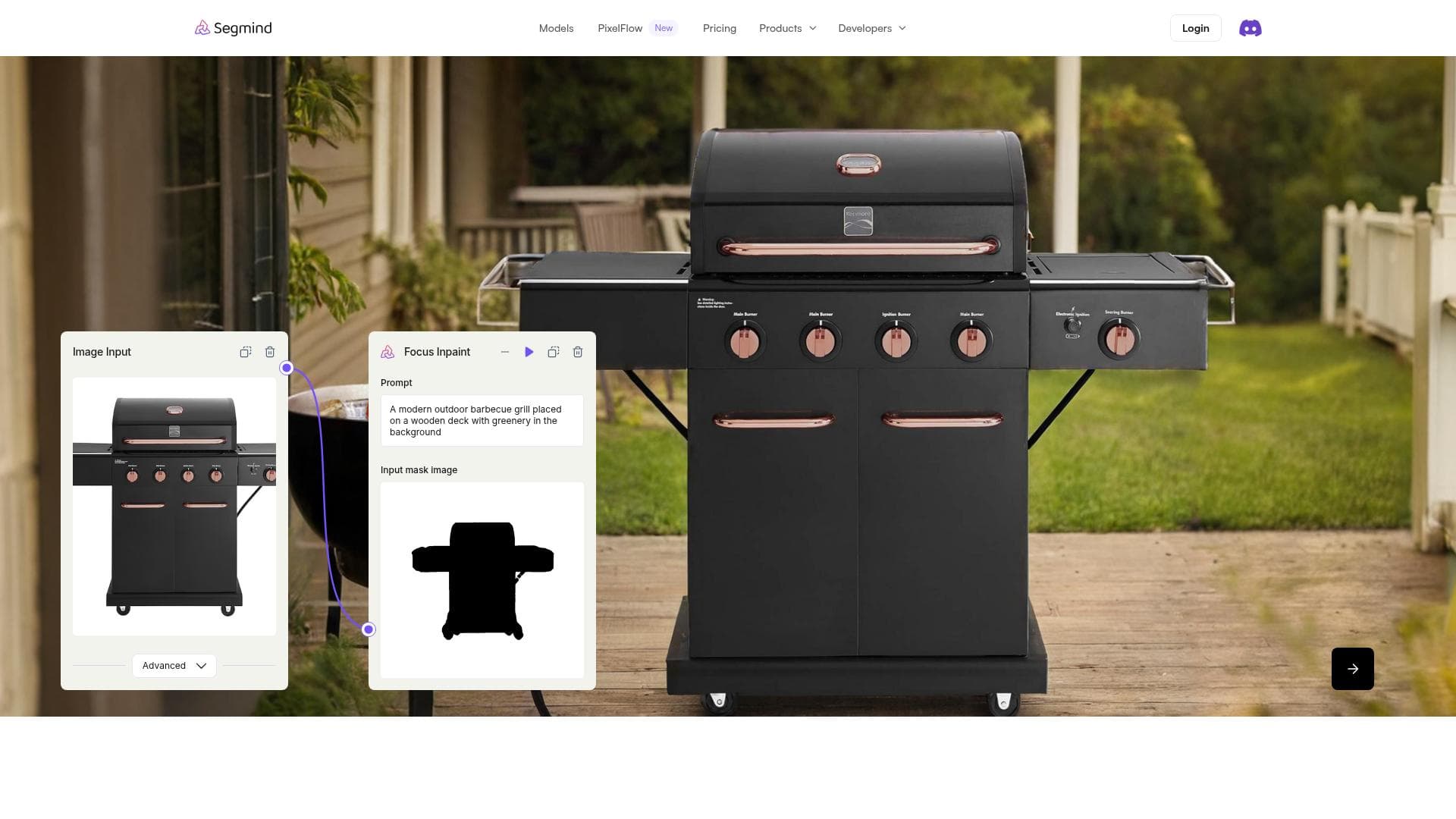
PixelFlow is a no-code visual AI platform that enables users to build and deploy sophisticated image and video workflows by connecting over 200 AI models via an intuitive drag-and-drop interface. Ideal for creators, marketers, and businesses, it accelerates innovation by simplifying complex AI-driven content generation and prototyping.
PixelFlow is a cutting-edge visual AI platform designed to empower users to create, customize, and deploy complex image and video workflows without any coding knowledge. At its core, PixelFlow aims to democratize access to advanced AI-driven visual content creation by providing a no-code environment where users can seamlessly connect and orchestrate over 200 open and closed AI models. This drag-and-drop interface allows creators, developers, and businesses to accelerate innovation and bring their creative visions to life with unprecedented ease and speed. One of the standout features of PixelFlow is its segmented AI image generation capability. This allows users to generate highly detailed and contextually segmented images, enabling precise control over visual elements within a composition. This is particularly useful for applications requiring nuanced image manipulation, such as advertising, digital art, and content creation. The platform’s no-code workflow prototyping further enhances productivity by enabling users to design and test complex AI-driven workflows visually, without writing a single line of code. This feature is ideal for rapid experimentation and iteration, reducing the time from concept to deployment. PixelFlow also functions as a rapid generative AI platform, supporting a wide range of generative tasks including image synthesis, style transfer, and video processing. The integration of both open-source and proprietary AI models ensures users have access to the latest advancements in AI technology, tailored to diverse creative and business needs. The drag-and-drop model connection system simplifies the process of combining multiple AI functions into a single workflow, making it accessible to non-technical users while still powerful enough for AI professionals. This platform is best suited for digital artists, marketers, content creators, and enterprises looking to leverage AI for visual media production. Use cases range from automated content generation for social media campaigns, personalized marketing visuals, creative prototyping for design teams, to video enhancement and editing workflows. PixelFlow’s flexibility and ease of use make it an excellent choice for startups and agencies aiming to innovate quickly without investing heavily in AI development resources. PixelFlow offers a freemium pricing model, allowing users to start experimenting with the platform at no cost. The free tier provides access to essential features and a limited number of workflow executions, making it ideal for individual creators and small teams to explore the platform’s capabilities. Paid plans typically unlock higher usage limits, access to premium AI models, priority support, and advanced workflow options, catering to professional users and larger organizations with more demanding requirements. Compared to alternatives, PixelFlow stands out due to its extensive model library and truly no-code approach, which lowers the barrier to entry for AI-powered visual content creation. While some platforms focus solely on image generation or require coding skills, PixelFlow’s drag-and-drop interface and multi-model integration capabilities provide a more comprehensive and user-friendly experience. However, users should consider that as a freemium platform, advanced features and higher usage volumes require subscription upgrades, which may be a factor for budget-conscious users. Notable limitations include the potential learning curve associated with designing complex workflows despite the no-code interface, especially for users unfamiliar with AI concepts. Additionally, performance and output quality can vary depending on the selected models and workflow configurations. Users should also be mindful of the ethical considerations and copyright implications when generating AI-based visual content. Overall, PixelFlow offers a powerful, flexible, and accessible solution for anyone looking to harness the power of visual AI without deep technical expertise.

Description
PixelFlow is a no-code visual AI platform that enables users to build and deploy sophisticated image and video workflows by connecting over 200 AI models via an intuitive drag-and-drop interface. Ideal for creators, marketers, and businesses, it accelerates innovation by simplifying complex AI-driven content generation and prototyping.
PixelFlow is a cutting-edge visual AI platform designed to empower users to create, customize, and deploy complex image and video workflows without any coding knowledge. At its core, PixelFlow aims to democratize access to advanced AI-driven visual content creation by providing a no-code environment where users can seamlessly connect and orchestrate over 200 open and closed AI models. This drag-and-drop interface allows creators, developers, and businesses to accelerate innovation and bring their creative visions to life with unprecedented ease and speed. One of the standout features of PixelFlow is its segmented AI image generation capability. This allows users to generate highly detailed and contextually segmented images, enabling precise control over visual elements within a composition. This is particularly useful for applications requiring nuanced image manipulation, such as advertising, digital art, and content creation. The platform’s no-code workflow prototyping further enhances productivity by enabling users to design and test complex AI-driven workflows visually, without writing a single line of code. This feature is ideal for rapid experimentation and iteration, reducing the time from concept to deployment. PixelFlow also functions as a rapid generative AI platform, supporting a wide range of generative tasks including image synthesis, style transfer, and video processing. The integration of both open-source and proprietary AI models ensures users have access to the latest advancements in AI technology, tailored to diverse creative and business needs. The drag-and-drop model connection system simplifies the process of combining multiple AI functions into a single workflow, making it accessible to non-technical users while still powerful enough for AI professionals. This platform is best suited for digital artists, marketers, content creators, and enterprises looking to leverage AI for visual media production. Use cases range from automated content generation for social media campaigns, personalized marketing visuals, creative prototyping for design teams, to video enhancement and editing workflows. PixelFlow’s flexibility and ease of use make it an excellent choice for startups and agencies aiming to innovate quickly without investing heavily in AI development resources. PixelFlow offers a freemium pricing model, allowing users to start experimenting with the platform at no cost. The free tier provides access to essential features and a limited number of workflow executions, making it ideal for individual creators and small teams to explore the platform’s capabilities. Paid plans typically unlock higher usage limits, access to premium AI models, priority support, and advanced workflow options, catering to professional users and larger organizations with more demanding requirements. Compared to alternatives, PixelFlow stands out due to its extensive model library and truly no-code approach, which lowers the barrier to entry for AI-powered visual content creation. While some platforms focus solely on image generation or require coding skills, PixelFlow’s drag-and-drop interface and multi-model integration capabilities provide a more comprehensive and user-friendly experience. However, users should consider that as a freemium platform, advanced features and higher usage volumes require subscription upgrades, which may be a factor for budget-conscious users. Notable limitations include the potential learning curve associated with designing complex workflows despite the no-code interface, especially for users unfamiliar with AI concepts. Additionally, performance and output quality can vary depending on the selected models and workflow configurations. Users should also be mindful of the ethical considerations and copyright implications when generating AI-based visual content. Overall, PixelFlow offers a powerful, flexible, and accessible solution for anyone looking to harness the power of visual AI without deep technical expertise.
Tool Features
- Segmented AI image generation
- No-code workflow prototyping
- Rapid generative AI platform
Frequently Asked Questions
What is PixelFlow?
PixelFlow is a no-code visual AI platform that allows users to create, customize, and deploy advanced image and video workflows by connecting over 200 open and closed AI models through a drag-and-drop interface.
How much does PixelFlow cost?
PixelFlow offers a freemium pricing model, providing free access to essential features with limited usage. Paid plans unlock higher usage limits, premium models, and advanced capabilities tailored for professional and enterprise users.
Who is PixelFlow best for?
PixelFlow is ideal for digital artists, marketers, content creators, design teams, startups, and enterprises seeking to leverage AI for rapid visual content generation and workflow prototyping without coding.
What are the main features of PixelFlow?
Key features include segmented AI image generation for precise visual control, no-code workflow prototyping for easy design and testing of AI workflows, and a rapid generative AI platform supporting diverse image and video generation tasks.
Does PixelFlow offer a free trial?
Yes, PixelFlow’s freemium model allows users to start using the platform for free with access to core features and limited workflow executions, enabling experimentation before upgrading to paid plans.
What integrations does PixelFlow support?
PixelFlow supports integration with over 200 open and closed AI models, which can be connected and orchestrated within its drag-and-drop interface to build customized image and video workflows.
How does PixelFlow work?
PixelFlow works by letting users visually design workflows that connect multiple AI models using a drag-and-drop interface. Users can generate and manipulate images and videos by combining these models into seamless, automated pipelines without coding.
Socials
Use ToolSponsored Tools













































Reviews
No reviews yet. Be the first to share your experience.















