Description
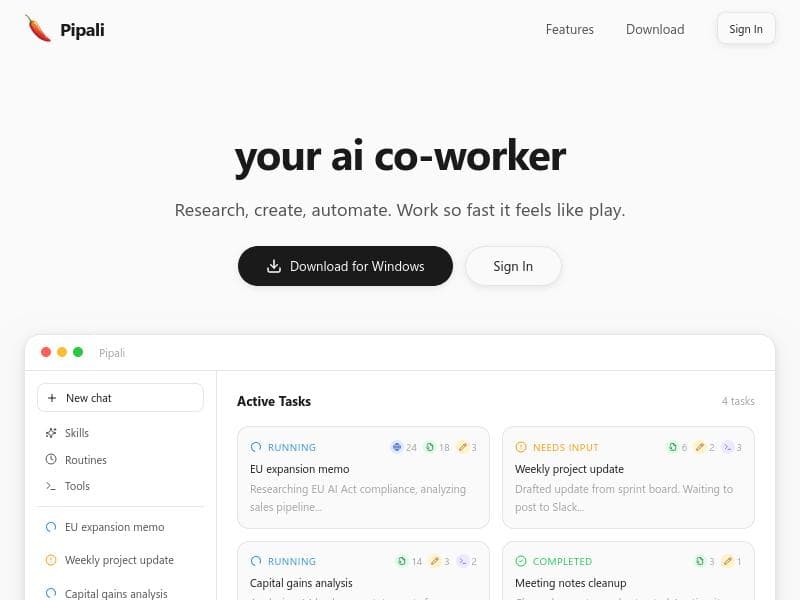
Pipali is a powerful AI coworker that lives on your computer, automating complex workflows, conducting deep research, and integrating seamlessly with apps like Slack and GitHub. Ideal for professionals who want a personalized, secure assistant to handle everything from document creation to routine tasks, Pipali transforms your computer into a smart productivity hub.
Pipali is an innovative AI coworker designed to seamlessly integrate with your computer environment, enabling you to accomplish a wide range of tasks efficiently and intelligently. Unlike traditional AI tools that operate solely in the cloud or within isolated applications, Pipali lives directly on your computer, interacting with your local files, browser, and installed apps to help you get real work done. Its core purpose is to augment your productivity by automating complex workflows, conducting deep research, generating polished documents, and managing routine errands, all while respecting your data privacy by running commands safely within a local sandbox. At the heart of Pipali's capabilities is its ability to perform comprehensive research across both your local documents and the web, providing you with relevant insights and information without the need to switch contexts or manually search multiple sources. It can create a variety of content types including documents, spreadsheets, emails, calendar events, and even personal apps tailored to your specific needs. This versatility allows users to streamline their workflow by consolidating multiple tasks into a single AI-powered assistant. One of Pipali's standout features is its customizable Skills system, which lets you teach the AI your unique workflows and processes. This personalization ensures that Pipali adapts to your specific work style and requirements, making it far more effective than generic AI assistants. Additionally, Pipali supports Routines, enabling you to automate recurring tasks on a schedule or trigger them on demand, which is ideal for repetitive jobs such as report generation, data updates, or email follow-ups. Integration is another key strength of Pipali. Through the Model Context Protocol (MCP), it connects with popular external tools like Linear, Slack, and GitHub, allowing you to extend its functionality and embed it deeply into your existing tech stack. This makes Pipali a powerful hub for managing both your local and cloud-based workflows in one place. Pipali is best suited for professionals who rely heavily on their computers for complex, multi-step tasks—such as knowledge workers, researchers, project managers, and developers. For example, a product manager can use Pipali to gather market research, draft project plans, and automate status updates in Slack, while a developer might automate issue tracking and code review notifications via GitHub integration. Its ability to handle both creative and administrative tasks makes it a versatile tool across industries. Regarding pricing, Pipali offers a freemium model, allowing users to access core features at no cost with optional upgrades for advanced capabilities and integrations. This approach lowers the barrier to entry and encourages users to explore its powerful features before committing financially. Compared to alternatives, Pipali stands out by operating locally on your machine, which enhances data security and responsiveness. Many AI assistants rely heavily on cloud processing, which can raise privacy concerns and latency issues. Furthermore, Pipali’s customizable Skills and Routines provide a level of workflow automation and personalization that many competitors lack. However, as a relatively new tool, it may have a smaller ecosystem of pre-built integrations and community support compared to more established platforms. Potential limitations include the learning curve associated with teaching Pipali custom Skills and setting up Routines, which might require some initial time investment. Additionally, since it runs locally, users need a compatible and sufficiently powerful computer to maximize performance. Lastly, while the freemium model is generous, some advanced features and integrations may require paid plans, which could be a consideration for budget-conscious users. In summary, Pipali is a robust AI coworker designed to transform how you interact with your computer by combining deep research capabilities, document creation, workflow automation, and app integration into a single, intelligent assistant. Its local operation, customization options, and integration support make it an excellent choice for professionals seeking to boost productivity while maintaining control over their data.

Description
Pipali is a powerful AI coworker that lives on your computer, automating complex workflows, conducting deep research, and integrating seamlessly with apps like Slack and GitHub. Ideal for professionals who want a personalized, secure assistant to handle everything from document creation to routine tasks, Pipali transforms your computer into a smart productivity hub.
Pipali is an innovative AI coworker designed to seamlessly integrate with your computer environment, enabling you to accomplish a wide range of tasks efficiently and intelligently. Unlike traditional AI tools that operate solely in the cloud or within isolated applications, Pipali lives directly on your computer, interacting with your local files, browser, and installed apps to help you get real work done. Its core purpose is to augment your productivity by automating complex workflows, conducting deep research, generating polished documents, and managing routine errands, all while respecting your data privacy by running commands safely within a local sandbox. At the heart of Pipali's capabilities is its ability to perform comprehensive research across both your local documents and the web, providing you with relevant insights and information without the need to switch contexts or manually search multiple sources. It can create a variety of content types including documents, spreadsheets, emails, calendar events, and even personal apps tailored to your specific needs. This versatility allows users to streamline their workflow by consolidating multiple tasks into a single AI-powered assistant. One of Pipali's standout features is its customizable Skills system, which lets you teach the AI your unique workflows and processes. This personalization ensures that Pipali adapts to your specific work style and requirements, making it far more effective than generic AI assistants. Additionally, Pipali supports Routines, enabling you to automate recurring tasks on a schedule or trigger them on demand, which is ideal for repetitive jobs such as report generation, data updates, or email follow-ups. Integration is another key strength of Pipali. Through the Model Context Protocol (MCP), it connects with popular external tools like Linear, Slack, and GitHub, allowing you to extend its functionality and embed it deeply into your existing tech stack. This makes Pipali a powerful hub for managing both your local and cloud-based workflows in one place. Pipali is best suited for professionals who rely heavily on their computers for complex, multi-step tasks—such as knowledge workers, researchers, project managers, and developers. For example, a product manager can use Pipali to gather market research, draft project plans, and automate status updates in Slack, while a developer might automate issue tracking and code review notifications via GitHub integration. Its ability to handle both creative and administrative tasks makes it a versatile tool across industries. Regarding pricing, Pipali offers a freemium model, allowing users to access core features at no cost with optional upgrades for advanced capabilities and integrations. This approach lowers the barrier to entry and encourages users to explore its powerful features before committing financially. Compared to alternatives, Pipali stands out by operating locally on your machine, which enhances data security and responsiveness. Many AI assistants rely heavily on cloud processing, which can raise privacy concerns and latency issues. Furthermore, Pipali’s customizable Skills and Routines provide a level of workflow automation and personalization that many competitors lack. However, as a relatively new tool, it may have a smaller ecosystem of pre-built integrations and community support compared to more established platforms. Potential limitations include the learning curve associated with teaching Pipali custom Skills and setting up Routines, which might require some initial time investment. Additionally, since it runs locally, users need a compatible and sufficiently powerful computer to maximize performance. Lastly, while the freemium model is generous, some advanced features and integrations may require paid plans, which could be a consideration for budget-conscious users. In summary, Pipali is a robust AI coworker designed to transform how you interact with your computer by combining deep research capabilities, document creation, workflow automation, and app integration into a single, intelligent assistant. Its local operation, customization options, and integration support make it an excellent choice for professionals seeking to boost productivity while maintaining control over their data.
Tool Features
- Research across local documents and the web
- Create documents, spreadsheets, emails, events and personal apps
- Automate routine workflows on a schedule or on demand
- Custom skills for personalized workflows
- Connect external tools via Model Context Protocol (MCP)
- Run commands safely in a local sandbox
Frequently Asked Questions
What is Pipali?
Pipali is an AI coworker that operates locally on your computer, helping you automate tasks, conduct research, create documents, and integrate with various apps to streamline your workflows.
How much does Pipali cost?
Pipali offers a freemium pricing model, providing access to core features for free with optional paid plans for advanced capabilities and integrations.
Who is Pipali best for?
Pipali is ideal for knowledge workers, researchers, project managers, developers, and professionals who need to automate complex workflows and manage tasks efficiently on their computers.
What are the main features of Pipali?
Key features include research across local documents and the web, document and spreadsheet creation, email and event management, automation of routine workflows via Skills and Routines, integration with external tools through MCP, and safe command execution in a local sandbox.
Does Pipali offer a free trial?
Yes, Pipali’s freemium model allows users to try core features at no cost, enabling them to evaluate the tool before opting for paid plans.
What integrations does Pipali support?
Pipali supports integrations with popular tools such as Linear, Slack, and GitHub through the Model Context Protocol (MCP), allowing seamless connectivity with your existing apps.
How does Pipali work?
Pipali runs locally on your computer, interacting with your files, browser, and apps. It uses AI to perform research, create content, automate workflows with custom Skills and Routines, and integrates with external tools securely within a sandboxed environment.
Socials
Use ToolSponsored Tools













































Reviews
No reviews yet. Be the first to share your experience.
















