
Description
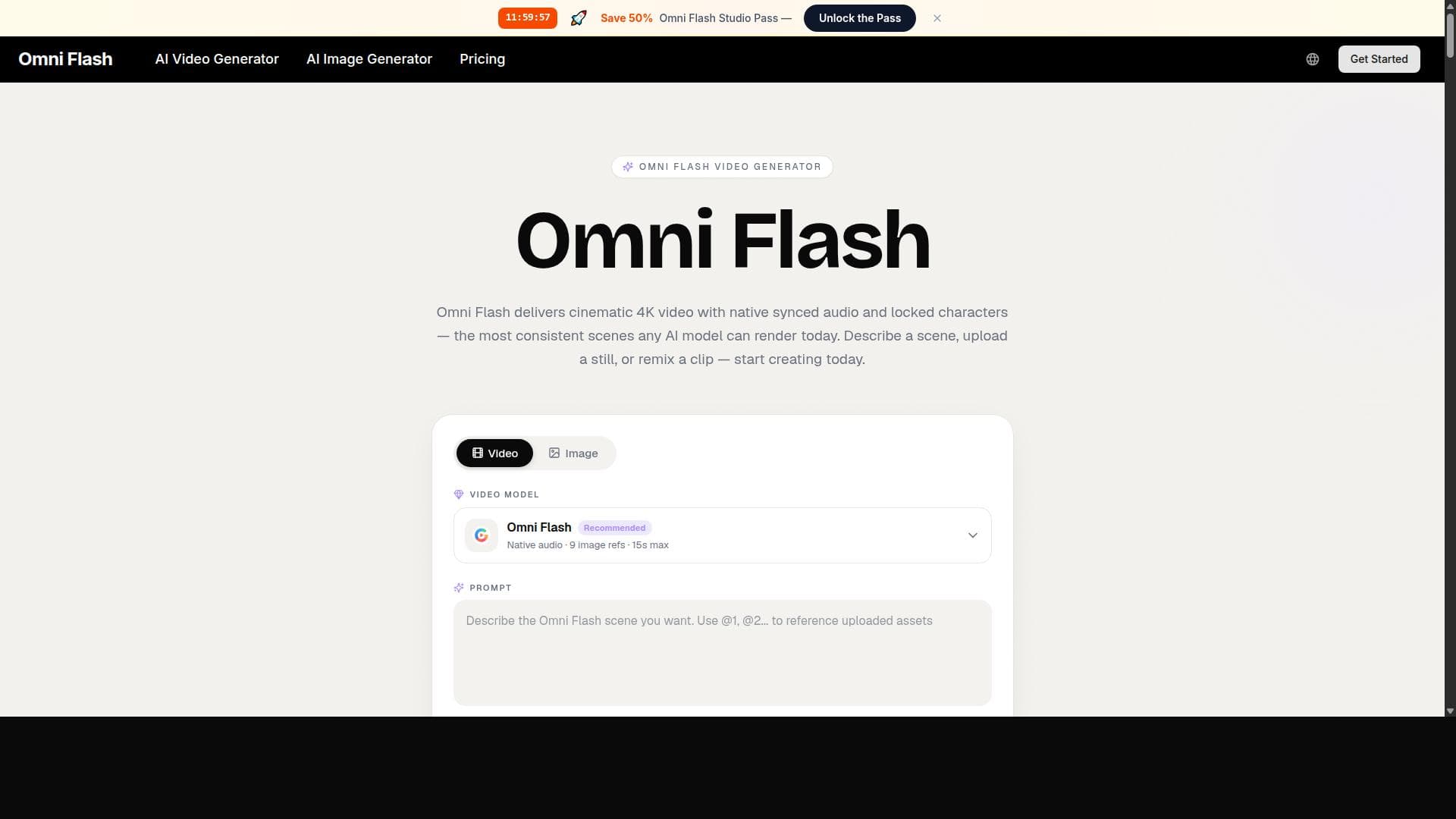
Omni Flash uniquely combines video, audio, dialogue, and lip-sync generation into a single AI-powered pass, enabling seamless cinematic video creation from text, images, or existing clips. Ideal for filmmakers, marketers, and content creators, it offers locked character consistency and native film grammar understanding for professional-grade, fast, and flexible video production.
Omni Flash is a cutting-edge AI video generation platform that revolutionizes the traditional video production workflow by consolidating multiple complex processes into a single, streamlined rendering engine. Unlike conventional AI video tools that require chaining separate applications for frame generation, lip-syncing, audio scoring, and compositing, Omni Flash integrates all these elements into one cohesive pass. Users can input a text prompt, a reference image, or an existing video clip, and the platform returns a fully synchronized cinematic scene complete with picture, motion, dialogue, and score. This holistic approach drastically simplifies video creation, making it faster and more accessible without sacrificing quality or creative control. At the heart of Omni Flash are three primary workflows designed to accommodate diverse video production needs. The text-to-video workflow allows users to describe scenes in natural language, which the AI then transforms into finished video clips. The image-to-video workflow animates still images, adding motion that respects the original composition and style. Lastly, conversational video remixing enables users to modify existing clips through chat prompts, allowing for wardrobe changes, location swaps, or shot extensions without the need to re-render the entire video from scratch. Each generated video can incorporate up to nine image references, run up to fifteen seconds in length, and output in resolutions up to 4K, complete with native synchronized audio, dialogue, and lip-sync. One of Omni Flash's standout capabilities is its locked character consistency feature, which allows faces, wardrobes, or brand assets to be pinned and preserved across multiple shots and even separate generations spaced days apart. This ensures continuity for lead characters throughout entire projects such as short films, ad campaigns, or product series without requiring retraining, a significant advantage over many single-purpose AI video tools. Additionally, the platform natively understands film grammar, including cinematographic vocabulary like focal length, depth of field, motivated lighting, tracking shots, dollies, and racks. This means users can direct the AI using professional cinematography language rather than relying on trial-and-error prompt crafting. Refinements are made through natural-language chat, where the AI selectively rewrites only the requested elements while preserving the rest of the composition. Users can also save looks as style presets, carrying palettes, grain, and motion feel into future projects for consistent visual branding. Omni Flash is ideal for a broad range of creative professionals and industries. Independent filmmakers use it for pre-visualizing scenes before location scouting, marketing teams produce hero campaign cuts and localize content across markets, ecommerce brands convert product photography into engaging sound-on motion content, and course creators develop short explainer sequences aligned with narration. Agencies leverage it to pitch multiple motion concepts quickly, music video directors craft multi-scene narratives, and game studios create cutscene mockups and animation first passes. The platform’s rapid preview turnaround—most under a minute—enables users to explore multiple creative directions efficiently before finalizing cuts. Regarding pricing and plans, Omni Flash’s website does not publicly disclose detailed pricing tiers, suggesting that interested users should contact the company directly for customized quotes based on usage needs. This approach is common for professional-grade tools that offer scalable solutions tailored to enterprise or creative studio requirements. Compared to alternatives, Omni Flash stands out by integrating all key video production stages into a single platform with synchronized outputs, unlike many competitors that focus on individual aspects like lip-sync or frame generation alone. Its locked character consistency and native understanding of film grammar provide a level of creative control and continuity rarely found in AI video tools. However, the platform currently limits video length to fifteen seconds per generation, which may require stitching multiple clips for longer projects. Additionally, while the conversational remixing feature is powerful, it may have a learning curve for users unfamiliar with natural-language direction in video editing. In summary, Omni Flash offers a comprehensive, efficient, and creatively flexible AI video generation solution that caters to professionals seeking cinematic quality and workflow simplification. Its unique blend of features makes it a valuable tool for filmmakers, marketers, educators, and content creators aiming to produce high-quality video content rapidly and with consistent visual storytelling.
Description
Omni Flash uniquely combines video, audio, dialogue, and lip-sync generation into a single AI-powered pass, enabling seamless cinematic video creation from text, images, or existing clips. Ideal for filmmakers, marketers, and content creators, it offers locked character consistency and native film grammar understanding for professional-grade, fast, and flexible video production.
Omni Flash is a cutting-edge AI video generation platform that revolutionizes the traditional video production workflow by consolidating multiple complex processes into a single, streamlined rendering engine. Unlike conventional AI video tools that require chaining separate applications for frame generation, lip-syncing, audio scoring, and compositing, Omni Flash integrates all these elements into one cohesive pass. Users can input a text prompt, a reference image, or an existing video clip, and the platform returns a fully synchronized cinematic scene complete with picture, motion, dialogue, and score. This holistic approach drastically simplifies video creation, making it faster and more accessible without sacrificing quality or creative control. At the heart of Omni Flash are three primary workflows designed to accommodate diverse video production needs. The text-to-video workflow allows users to describe scenes in natural language, which the AI then transforms into finished video clips. The image-to-video workflow animates still images, adding motion that respects the original composition and style. Lastly, conversational video remixing enables users to modify existing clips through chat prompts, allowing for wardrobe changes, location swaps, or shot extensions without the need to re-render the entire video from scratch. Each generated video can incorporate up to nine image references, run up to fifteen seconds in length, and output in resolutions up to 4K, complete with native synchronized audio, dialogue, and lip-sync. One of Omni Flash's standout capabilities is its locked character consistency feature, which allows faces, wardrobes, or brand assets to be pinned and preserved across multiple shots and even separate generations spaced days apart. This ensures continuity for lead characters throughout entire projects such as short films, ad campaigns, or product series without requiring retraining, a significant advantage over many single-purpose AI video tools. Additionally, the platform natively understands film grammar, including cinematographic vocabulary like focal length, depth of field, motivated lighting, tracking shots, dollies, and racks. This means users can direct the AI using professional cinematography language rather than relying on trial-and-error prompt crafting. Refinements are made through natural-language chat, where the AI selectively rewrites only the requested elements while preserving the rest of the composition. Users can also save looks as style presets, carrying palettes, grain, and motion feel into future projects for consistent visual branding. Omni Flash is ideal for a broad range of creative professionals and industries. Independent filmmakers use it for pre-visualizing scenes before location scouting, marketing teams produce hero campaign cuts and localize content across markets, ecommerce brands convert product photography into engaging sound-on motion content, and course creators develop short explainer sequences aligned with narration. Agencies leverage it to pitch multiple motion concepts quickly, music video directors craft multi-scene narratives, and game studios create cutscene mockups and animation first passes. The platform’s rapid preview turnaround—most under a minute—enables users to explore multiple creative directions efficiently before finalizing cuts. Regarding pricing and plans, Omni Flash’s website does not publicly disclose detailed pricing tiers, suggesting that interested users should contact the company directly for customized quotes based on usage needs. This approach is common for professional-grade tools that offer scalable solutions tailored to enterprise or creative studio requirements. Compared to alternatives, Omni Flash stands out by integrating all key video production stages into a single platform with synchronized outputs, unlike many competitors that focus on individual aspects like lip-sync or frame generation alone. Its locked character consistency and native understanding of film grammar provide a level of creative control and continuity rarely found in AI video tools. However, the platform currently limits video length to fifteen seconds per generation, which may require stitching multiple clips for longer projects. Additionally, while the conversational remixing feature is powerful, it may have a learning curve for users unfamiliar with natural-language direction in video editing. In summary, Omni Flash offers a comprehensive, efficient, and creatively flexible AI video generation solution that caters to professionals seeking cinematic quality and workflow simplification. Its unique blend of features makes it a valuable tool for filmmakers, marketers, educators, and content creators aiming to produce high-quality video content rapidly and with consistent visual storytelling.
Tool Features
- One render produces video, audio, dialogue, and lip-sync together
- Locked character consistency across shots and separate generations
- Cinematic 4K output with commercial-use license and no watermark
- Text-to-video, image-to-video, and conversational video remix in one platform
Frequently Asked Questions
What is Omni Flash?
Omni Flash is an AI video generation platform that consolidates multiple video production steps—frame generation, lip-sync, audio scoring, and compositing—into a single rendering engine. It creates fully synchronized cinematic scenes from text prompts, reference images, or existing video clips.
How much does Omni Flash cost?
Omni Flash does not publicly list pricing on its website. Interested users should contact the company directly to receive customized pricing and plans tailored to their specific usage and project requirements.
Who is Omni Flash best for?
Omni Flash is ideal for independent filmmakers, marketing teams, ecommerce brands, course creators, agencies, music video directors, and game studios—anyone needing fast, high-quality AI-generated cinematic video content with synchronized audio and dialogue.
What are the main features of Omni Flash?
Key features include one-pass rendering of video, audio, dialogue, and lip-sync; locked character consistency across shots and generations; cinematic 4K output with commercial-use license and no watermark; and support for text-to-video, image-to-video, and conversational video remix workflows.
Does Omni Flash offer a free trial?
There is no publicly available information about a free trial on the Omni Flash website. Prospective users should inquire directly with the company for trial options or demos.
What integrations does Omni Flash support?
The platform primarily functions as a standalone AI video generation tool. Specific third-party integrations are not detailed publicly, so users should contact Omni Flash for information on workflow or software integrations.
How does Omni Flash work?
Omni Flash accepts input in the form of text prompts, reference images, or existing video clips and uses AI to generate fully synchronized cinematic scenes. It combines frame generation, lip-sync, audio scoring, and compositing in one rendering pass, allowing users to refine results via natural-language chat and maintain character consistency across multiple shots.
Sponsored Tools













































Reviews
No reviews yet. Be the first to share your experience.















