Description
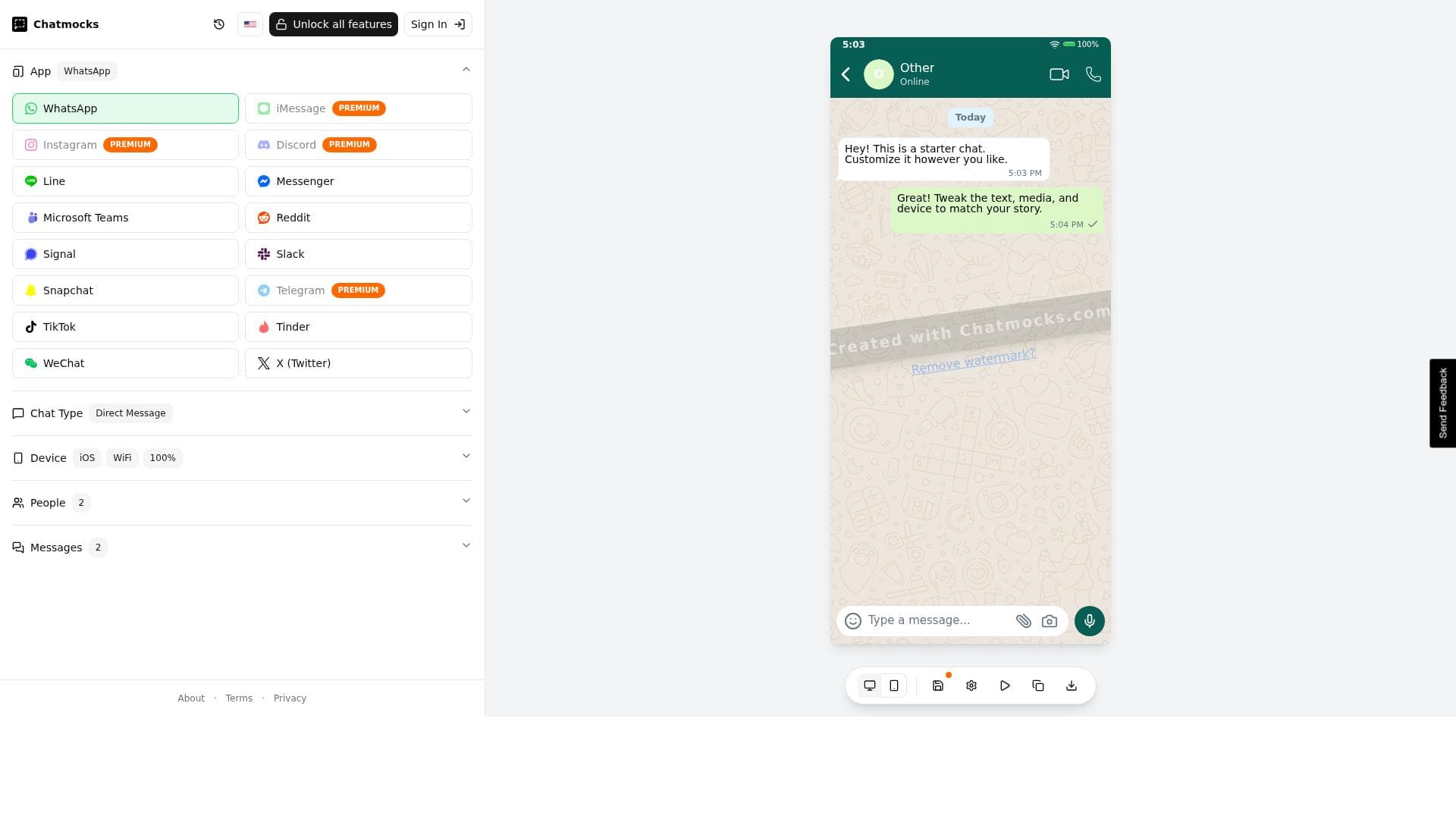
Chatmocks is a free online tool that creates pixel-perfect, realistic fake chat conversation mockups across 15+ messaging platforms including WhatsApp, iMessage, and Instagram. Ideal for marketers, creators, and designers, it offers extensive customization and device simulation to produce authentic chat visuals without hassle.
Chatmocks is a versatile online tool designed to create highly realistic, pixel-perfect fake chat conversation mockups across a wide range of popular messaging platforms. Its core purpose is to enable marketers, content creators, designers, and social media managers to generate visually authentic chat screenshots that can be used for presentations, marketing campaigns, social media posts, or app demonstrations. By simulating conversations on over 15 messaging apps, including WhatsApp, iMessage, and Instagram, Chatmocks offers a comprehensive solution for anyone needing to showcase chat interactions without relying on actual conversations or risking privacy issues. One of the standout features of Chatmocks is its extensive customization capabilities. Users can tailor every aspect of the chat mockup, from the messages themselves to the contact names and profile pictures, ensuring the mockups are contextually relevant and engaging. The tool supports a broad spectrum of messaging platforms, which means users can create mockups that align perfectly with their target audience’s preferred communication channels. The pixel-perfect design ensures that the mockups look professional and authentic, making them indistinguishable from real screenshots. Additionally, Chatmocks offers device settings customization, allowing users to simulate chats on different phone models and operating systems, further enhancing the realism of the mockups. Chatmocks is particularly beneficial for marketers who want to create compelling social media content or advertisements that feature chat conversations. Influencers and content creators can use it to craft engaging storytelling posts or tutorials. App developers and UX/UI designers can leverage Chatmocks to present chat-based app interfaces during pitches or user testing scenarios. Its ease of use and online accessibility mean that no software installation is required, making it accessible to users with varying levels of technical expertise. In terms of pricing, Chatmocks is completely free to use, which is a significant advantage compared to many other design tools that require subscriptions or one-time payments. This free access lowers the barrier to entry and encourages experimentation and creativity without financial commitment. While some competitors offer similar chat mockup capabilities, Chatmocks stands out due to its broad app support, high-fidelity design, and zero cost. When compared to alternative tools, Chatmocks excels in simplicity and specificity. Many design platforms offer chat mockup features as part of larger suites, which can be overwhelming or expensive. Chatmocks focuses solely on chat mockups, delivering a streamlined experience with specialized features that cater directly to this niche. However, it is worth noting that Chatmocks currently operates as a web-based tool without offline functionality or advanced collaboration features, which some teams might require for more complex projects. While Chatmocks provides a robust set of features, users should consider that it is primarily intended for creating static mockups rather than interactive prototypes. Additionally, since it is a free tool, users should be mindful of any usage limits or potential changes in feature availability over time. Overall, Chatmocks offers an excellent balance of quality, usability, and cost-effectiveness for anyone needing realistic chat conversation mockups quickly and easily.

Description
Chatmocks is a free online tool that creates pixel-perfect, realistic fake chat conversation mockups across 15+ messaging platforms including WhatsApp, iMessage, and Instagram. Ideal for marketers, creators, and designers, it offers extensive customization and device simulation to produce authentic chat visuals without hassle.
Chatmocks is a versatile online tool designed to create highly realistic, pixel-perfect fake chat conversation mockups across a wide range of popular messaging platforms. Its core purpose is to enable marketers, content creators, designers, and social media managers to generate visually authentic chat screenshots that can be used for presentations, marketing campaigns, social media posts, or app demonstrations. By simulating conversations on over 15 messaging apps, including WhatsApp, iMessage, and Instagram, Chatmocks offers a comprehensive solution for anyone needing to showcase chat interactions without relying on actual conversations or risking privacy issues. One of the standout features of Chatmocks is its extensive customization capabilities. Users can tailor every aspect of the chat mockup, from the messages themselves to the contact names and profile pictures, ensuring the mockups are contextually relevant and engaging. The tool supports a broad spectrum of messaging platforms, which means users can create mockups that align perfectly with their target audience’s preferred communication channels. The pixel-perfect design ensures that the mockups look professional and authentic, making them indistinguishable from real screenshots. Additionally, Chatmocks offers device settings customization, allowing users to simulate chats on different phone models and operating systems, further enhancing the realism of the mockups. Chatmocks is particularly beneficial for marketers who want to create compelling social media content or advertisements that feature chat conversations. Influencers and content creators can use it to craft engaging storytelling posts or tutorials. App developers and UX/UI designers can leverage Chatmocks to present chat-based app interfaces during pitches or user testing scenarios. Its ease of use and online accessibility mean that no software installation is required, making it accessible to users with varying levels of technical expertise. In terms of pricing, Chatmocks is completely free to use, which is a significant advantage compared to many other design tools that require subscriptions or one-time payments. This free access lowers the barrier to entry and encourages experimentation and creativity without financial commitment. While some competitors offer similar chat mockup capabilities, Chatmocks stands out due to its broad app support, high-fidelity design, and zero cost. When compared to alternative tools, Chatmocks excels in simplicity and specificity. Many design platforms offer chat mockup features as part of larger suites, which can be overwhelming or expensive. Chatmocks focuses solely on chat mockups, delivering a streamlined experience with specialized features that cater directly to this niche. However, it is worth noting that Chatmocks currently operates as a web-based tool without offline functionality or advanced collaboration features, which some teams might require for more complex projects. While Chatmocks provides a robust set of features, users should consider that it is primarily intended for creating static mockups rather than interactive prototypes. Additionally, since it is a free tool, users should be mindful of any usage limits or potential changes in feature availability over time. Overall, Chatmocks offers an excellent balance of quality, usability, and cost-effectiveness for anyone needing realistic chat conversation mockups quickly and easily.
Tool Features
- Create realistic chat mockups
- Custom messages and contacts
- Supports 15+ messaging apps including WhatsApp, iMessage, Instagram
- Pixel-perfect design
- Free online tool
Frequently Asked Questions
What is Chatmocks?
Chatmocks is an online tool that allows users to create realistic, pixel-perfect fake chat conversation mockups for over 15 messaging apps such as WhatsApp, iMessage, and Instagram. It is designed to help marketers, creators, and designers generate authentic-looking chat screenshots for various purposes.
How much does Chatmocks cost?
Chatmocks is completely free to use. There are no subscription fees or hidden charges, making it accessible for anyone who wants to create chat mockups without financial commitment.
Who is Chatmocks best for?
Chatmocks is best suited for marketers, social media managers, content creators, influencers, app developers, and UX/UI designers who need to create visually authentic chat conversation mockups for presentations, marketing campaigns, social media content, or app demonstrations.
What are the main features of Chatmocks?
Key features include the ability to create realistic chat mockups with pixel-perfect design, customize messages and contacts, support for over 15 messaging apps including WhatsApp, iMessage, and Instagram, and device settings customization to simulate different phone models and operating systems.
Does Chatmocks offer a free trial?
Chatmocks does not require a free trial because it is entirely free to use with all features accessible from the start.
What integrations does Chatmocks support?
Chatmocks supports creating mockups for more than 15 messaging apps including popular platforms like WhatsApp, iMessage, and Instagram. However, it does not currently offer integrations with third-party software or platforms beyond these chat app simulations.
How does Chatmocks work?
Users visit the Chatmocks website and select the messaging app they want to simulate. They then customize the chat by adding messages, contacts, and adjusting device settings. The tool generates a pixel-perfect chat mockup image that can be downloaded and used for various creative or marketing purposes.
Sponsored Tools













































Reviews
No reviews yet. Be the first to share your experience.















