Description
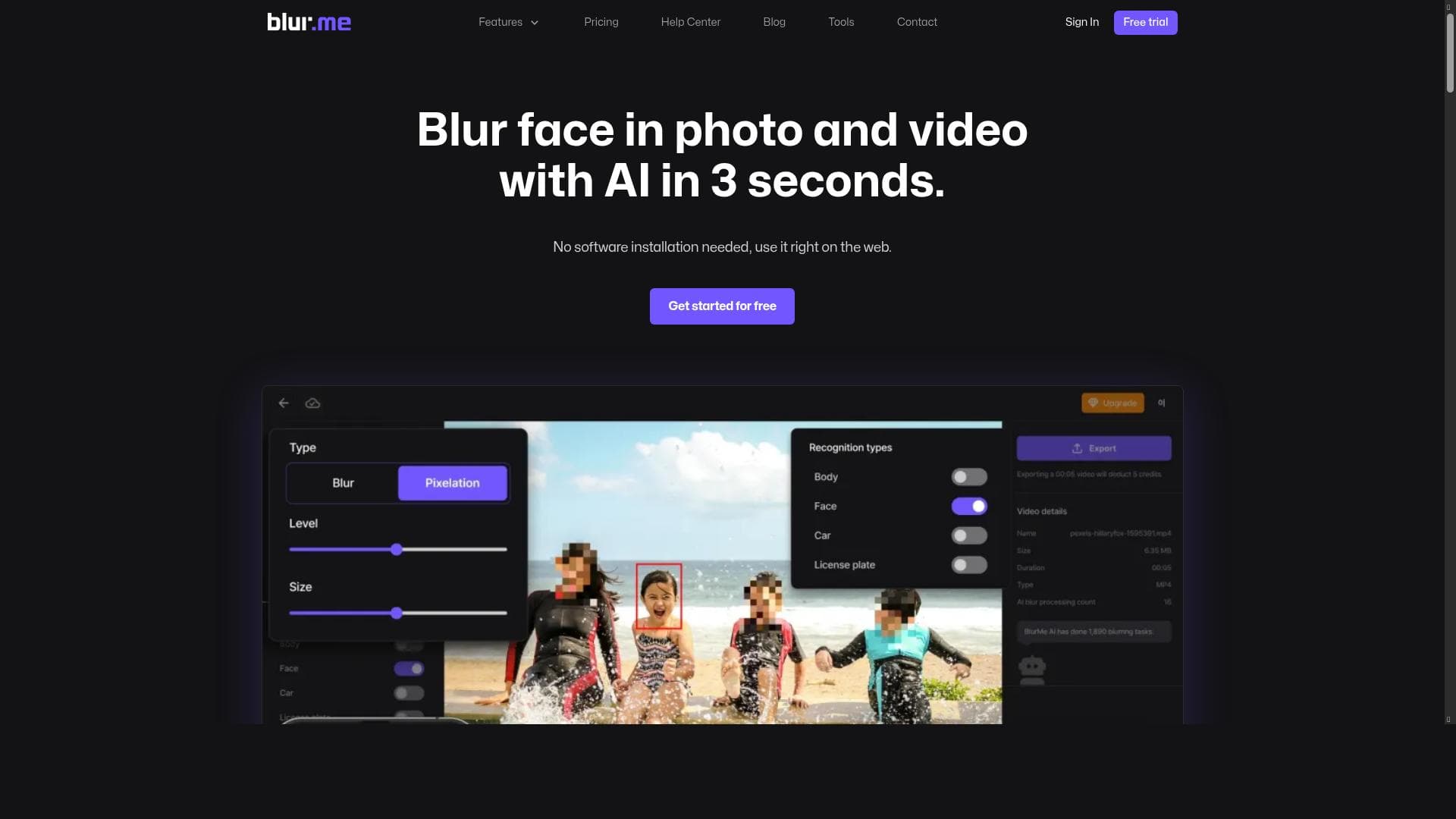
BlurMe - AI Face Blur is a browser-based AI tool that automatically detects and blurs faces, license plates, and private areas in images and videos, ensuring privacy and legal compliance with minimal effort. Ideal for content creators, journalists, and businesses, it offers fast, accurate blurring for multiple moving subjects without software installation.
BlurMe - AI Face Blur is a cutting-edge web-based tool designed to automatically blur faces, people, license plates, and other private areas in both images and videos. Its core purpose is to provide users with a seamless and efficient way to protect privacy and comply with personal information laws without requiring advanced technical skills or software installations. By operating directly in the browser, BlurMe eliminates the need for uploading sensitive content to third-party servers, enhancing security and user control over their data. This makes it an ideal solution for individuals and organizations that handle visual content containing personal or sensitive information. At the heart of BlurMe's functionality is its advanced AI-powered automatic face detection and blurring technology. The tool can accurately identify multiple faces within a single frame, even when subjects are moving, which is particularly useful for videos where subjects may shift positions or enter and exit the scene. Beyond faces, BlurMe extends its blurring capabilities to license plates and other private areas, ensuring comprehensive privacy protection. The blurring process is fast and precise, allowing users to process images and videos quickly without sacrificing quality. Additionally, the tool supports a wide range of video formats and image types, making it versatile for various use cases. BlurMe is best suited for content creators, journalists, social media managers, legal professionals, and organizations that need to share or publish visual content while safeguarding personal information. For example, journalists can use BlurMe to anonymize subjects in sensitive news footage, while businesses can blur customer faces or license plates in marketing materials to comply with privacy regulations. It is also valuable for educators and researchers who share visual data but must protect participant identities. The tool’s browser-based nature means it can be accessed from any device with internet connectivity, making it convenient for remote teams and on-the-go editing. Regarding pricing, BlurMe operates on a freemium model. Users can access basic blurring features for free, which is sufficient for occasional or low-volume use. For more advanced needs, such as processing higher-resolution videos, batch processing, or accessing priority support, premium plans are available. These paid tiers offer enhanced capabilities and greater usage limits, catering to professional users and organizations that require consistent and large-scale privacy protection. The transparent pricing structure allows users to choose the plan that best fits their requirements without unnecessary expenditure. When compared to alternatives, BlurMe stands out due to its fully browser-based operation combined with robust AI detection algorithms. Unlike some desktop software that requires installation and manual editing, BlurMe automates the entire process, saving time and reducing errors. Its support for multiple moving subjects in videos is a notable advantage over simpler tools that only handle static images or single faces. However, some specialized software might offer more granular manual editing controls or integration with larger video editing suites, which BlurMe currently does not provide. Nevertheless, for users prioritizing ease of use, speed, and privacy compliance, BlurMe offers a compelling balance. One limitation to consider is that while BlurMe’s AI is highly accurate, no automated system is perfect; occasional missed faces or blurred areas may require manual review or additional editing. Additionally, as a browser-based tool, performance can depend on the user’s internet connection and device capabilities, especially when processing large video files. Users should also be mindful of the freemium plan’s usage limits and assess whether the premium options align with their volume needs. Overall, BlurMe is a powerful and user-friendly tool for anyone needing reliable face and privacy blurring directly within their browser, combining convenience with strong privacy safeguards.

Description
BlurMe - AI Face Blur is a browser-based AI tool that automatically detects and blurs faces, license plates, and private areas in images and videos, ensuring privacy and legal compliance with minimal effort. Ideal for content creators, journalists, and businesses, it offers fast, accurate blurring for multiple moving subjects without software installation.
BlurMe - AI Face Blur is a cutting-edge web-based tool designed to automatically blur faces, people, license plates, and other private areas in both images and videos. Its core purpose is to provide users with a seamless and efficient way to protect privacy and comply with personal information laws without requiring advanced technical skills or software installations. By operating directly in the browser, BlurMe eliminates the need for uploading sensitive content to third-party servers, enhancing security and user control over their data. This makes it an ideal solution for individuals and organizations that handle visual content containing personal or sensitive information. At the heart of BlurMe's functionality is its advanced AI-powered automatic face detection and blurring technology. The tool can accurately identify multiple faces within a single frame, even when subjects are moving, which is particularly useful for videos where subjects may shift positions or enter and exit the scene. Beyond faces, BlurMe extends its blurring capabilities to license plates and other private areas, ensuring comprehensive privacy protection. The blurring process is fast and precise, allowing users to process images and videos quickly without sacrificing quality. Additionally, the tool supports a wide range of video formats and image types, making it versatile for various use cases. BlurMe is best suited for content creators, journalists, social media managers, legal professionals, and organizations that need to share or publish visual content while safeguarding personal information. For example, journalists can use BlurMe to anonymize subjects in sensitive news footage, while businesses can blur customer faces or license plates in marketing materials to comply with privacy regulations. It is also valuable for educators and researchers who share visual data but must protect participant identities. The tool’s browser-based nature means it can be accessed from any device with internet connectivity, making it convenient for remote teams and on-the-go editing. Regarding pricing, BlurMe operates on a freemium model. Users can access basic blurring features for free, which is sufficient for occasional or low-volume use. For more advanced needs, such as processing higher-resolution videos, batch processing, or accessing priority support, premium plans are available. These paid tiers offer enhanced capabilities and greater usage limits, catering to professional users and organizations that require consistent and large-scale privacy protection. The transparent pricing structure allows users to choose the plan that best fits their requirements without unnecessary expenditure. When compared to alternatives, BlurMe stands out due to its fully browser-based operation combined with robust AI detection algorithms. Unlike some desktop software that requires installation and manual editing, BlurMe automates the entire process, saving time and reducing errors. Its support for multiple moving subjects in videos is a notable advantage over simpler tools that only handle static images or single faces. However, some specialized software might offer more granular manual editing controls or integration with larger video editing suites, which BlurMe currently does not provide. Nevertheless, for users prioritizing ease of use, speed, and privacy compliance, BlurMe offers a compelling balance. One limitation to consider is that while BlurMe’s AI is highly accurate, no automated system is perfect; occasional missed faces or blurred areas may require manual review or additional editing. Additionally, as a browser-based tool, performance can depend on the user’s internet connection and device capabilities, especially when processing large video files. Users should also be mindful of the freemium plan’s usage limits and assess whether the premium options align with their volume needs. Overall, BlurMe is a powerful and user-friendly tool for anyone needing reliable face and privacy blurring directly within their browser, combining convenience with strong privacy safeguards.
Tool Features
- Automatic face detection and blurring in videos and images
- Supports multiple faces and moving subjects
- Ensures privacy protection and compliance with personal information laws
Frequently Asked Questions
What is BlurMe - AI Face Blur?
BlurMe - AI Face Blur is an online tool that automatically detects and blurs faces, people, license plates, and other private areas in images and videos directly within your browser to protect privacy and comply with personal information laws.
How much does BlurMe - AI Face Blur cost?
BlurMe offers a freemium pricing model with free access to basic blurring features. Premium plans with enhanced capabilities, higher usage limits, and priority support are available for professional or high-volume users.
Who is BlurMe - AI Face Blur best for?
It is best suited for content creators, journalists, social media managers, legal professionals, educators, and businesses that need to anonymize visual content quickly and efficiently while ensuring privacy compliance.
What are the main features of BlurMe - AI Face Blur?
Key features include automatic face detection and blurring in both images and videos, support for multiple faces and moving subjects, blurring of license plates and private areas, browser-based operation, and compliance with privacy laws.
Does BlurMe - AI Face Blur offer a free trial?
Yes, BlurMe provides free access to its basic features through its freemium plan, allowing users to try the tool without any upfront cost.
What integrations does BlurMe - AI Face Blur support?
BlurMe primarily operates as a standalone browser-based tool and does not currently offer direct integrations with other platforms or software.
How does BlurMe - AI Face Blur work?
BlurMe uses AI-powered algorithms to automatically detect faces, license plates, and private areas in images and videos. It then applies blur effects in real-time within the browser, allowing users to quickly anonymize sensitive content without manual editing.
Sponsored Tools













































Reviews
No reviews yet. Be the first to share your experience.